




Intuit announced on Monday that it has begun testing a new QuickBooks interface that creates a combined QuickBooks Online and Mailchimp platform experience, which the Mountain View, CA-based company said will help businesses accelerate productivity and profitability.
Currently, the target audience for the test is new QuickBooks Online customers not yet connected to accountants, Intuit said.
“With the QuickBooks Online interface we’re testing, businesses will see a carousel [see image below] that shows key applications they use every day to complete the jobs that need to be done,” Intuit said in a media release on Jan. 27.
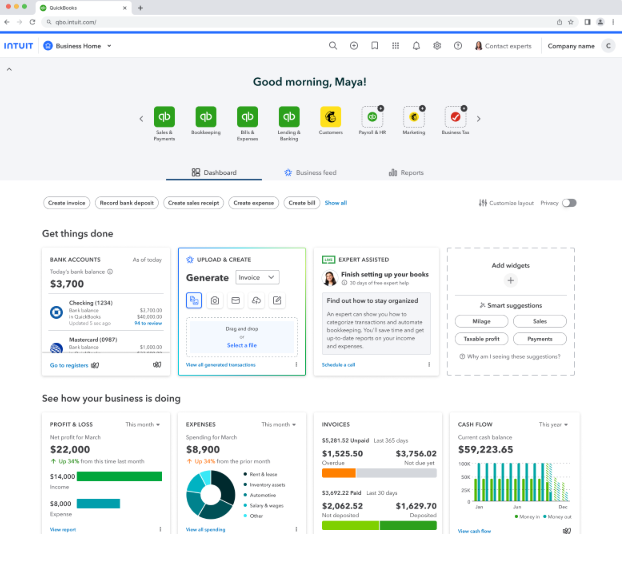
According to Intuit, here are a few factors to consider for how businesses and their accountants can opt-in or out of this test:
- Customers choose to opt-in or out of the test, and if participating businesses decide to opt out of the test, QuickBooks will automatically revert to its standard user interface.
- Businesses that choose to take part in the test may add an accountant during the test period. As a result, accountants will see the new experience when they access their client’s books through QuickBooks Online Accountant.
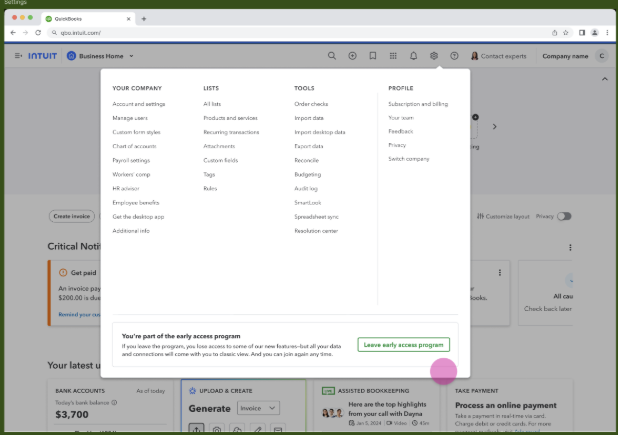
- However, accountants can choose to opt their client out of the test on their behalf. To do so, just click on the settings gear icon on the navigation bar on the top of the screen. A pop-up window will appear with a “Leave early access program” prompt at the bottom. Click on the prompt, submit the request, and QuickBooks will revert to the standard format. (See image below.)
“As we begin our journey to deliver an integrated and connected platform, we’re excited by the opportunity to learn from and co-create with accounting professionals and the participating businesses,” Intuit said. “Accountants are our No. 1 partners, and their feedback is valuable to us. We welcome accountants to share their thoughts with us should they and their clients interact with the test experience.”
Accountants can share their feedback by clicking the gear icon in the top right corner and selecting “Feedback,” Intuit said.
For additional details on this update, visit here.
Sign in to get access to this free resource, and all of our whitepapers and reports.

Download this content today!
Register Now Already registered? Click here to Log In