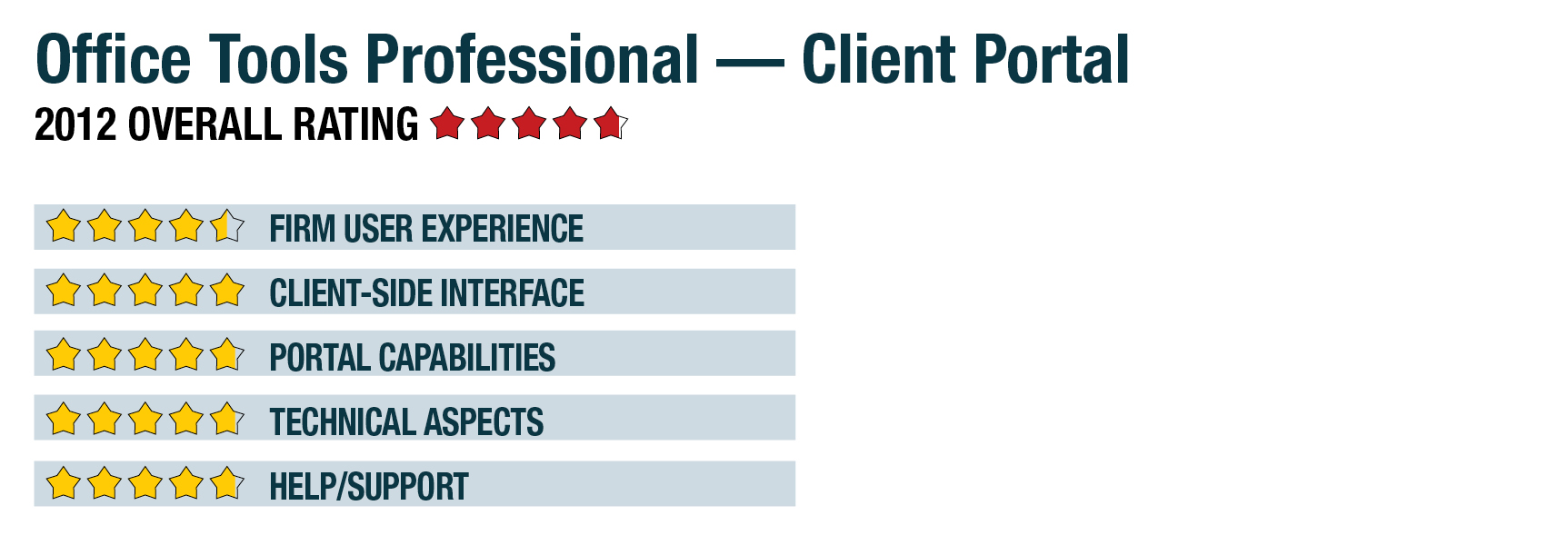
2012 Review of Office Tools Professional — Client Portal
Office Tools Professional - Client Portal
888-667-8440
www.OfficeToolsPro.com
From the January 2012 Review of Client Portals.
Best Fit:
Firms using or considering the Office Tools Professional Practice Management 2011 system, who want to provide user-friendly portals to clients.
Strengths:
- Tight integration with Practice Management 2011 system
- Project management and file sharing
- Built-in client communication tools
- Customizable firm branding
- Good integration with outside programs
Potential Limitations:
- Requires use of the Practice Management 2011 system
Office Tools Professional is one of the most popular practice management and invoicing systems for small and mid-sized professional services firms. The vendor offers versions and feature sets designed for tax and accounting firms and other professionals, such as integration with QuickBooks, Microsoft Office products and Lacerte Tax. About two years ago, the company added DropFolder.net as an optional add-on to the vendor’s practice management system, providing a basic integrated method for professionals to securely send and receive files to and from clients. This year, Office Tools Professional dramatically expanded these collaboration capabilities with the introduction of the Practice Management 2011 Client Portals add-on, which includes invoicing and payment options for clients, coordinated project management, client messaging, email marketing functions and other features.
Firm User Experience - 4.5 Stars
The Client Portals system is an optional feature that, from the firm staff perspective, works completely from within Office Tools Professional, with its functions available from the client setup and client document management screens. It provides quick views of all files currently being shared with the client, including those sent to the portal by the client. The system offers the ability for clients to add files to their portal individually or in bulk, with access to built-in client messaging options, project management tools and the ability to push invoices to the portal.
Client portals can be created individually or across multiple clients at the same time, with the system sending a firm-customizable, template-based invitation to the portal via email. The client-side portal views can also be easily customized to show firm branding elements, including logos and contact information.
Firms using the Client Portals can have as many concurrent users as they have licensed on the broader practice management program, and can create any number of portals with multiple users per client. The system includes tools that allow firm administrators to manage user rights for clients and firm staff, such as restricting or giving access to specific functions. However, multiple client users at the same company cannot be given different access rights.
The portals for Office Tools Professional are hosted on RackSpace datacenters, one of the largest secure data hosting providers in the United States. RackSpace has undergone a SAS 70 Type II audit and is HIPPA and FINRA compliant. User agreements do not guarantee connectivity uptime, but RackSpace documents more than 99.999 percent uptime over the past two years. Data protection includes encryption prior to transmission and throughout storage on the servers, as well as redundant geographically dispersed datacenter sites.
Client User Experience - 5 Stars
Clients can access their portals either via links in email messages sent by the firm or through a login field that can be integrated into the firm’s website. The web-based interface offers a tabbed display that allows users to move between views of all documents in a list, or to view them as they relate to project folders, such as tax engagements by year, payroll services by month, or other firm-determined structures and naming.
- « Previous Page
- 1
- 2
- 3
- Next Page »