


AI-native accounting platform Digits has launched a new feature in Digits Pro called Budgets, which founder and CEO Jeff Seibert says “keeps Budget vs. Actuals current as your books change.”
“What if your budget updated itself every time a transaction hit the books? Today we’re launching Budgets in Digits Pro,” he wrote in a blog post on Nov. 10. “Bring the budget you already have, and Digits keeps Budget vs. Actuals current as your books change. Variance stops being a month-end project. It’s done for you.”
According to Seibert, key features of Budgets include:
- Digits reads real-world budget spreadsheets: Monthly or quarterly period grids, single annual amounts, or multi-tab workbooks.
- AI maps it, math checks it: AI figures out the layout; deterministic code reads the amounts and verifies them against the workbook’s own subtotals and totals. Every imported number traces back to its source cell.
- Matches to your books automatically: Rows map to your chart of accounts, including account numbers. Anything ambiguous gets flagged for a human, not guessed.
- QuickBooks budgets come with you: Budgets in a connected QuickBooks file import automatically during sync.
- Works where your documents land: Upload from Budgets or drop the file into your document vault—Digits recognizes it as a budget and imports it. You get notified when it’s ready.
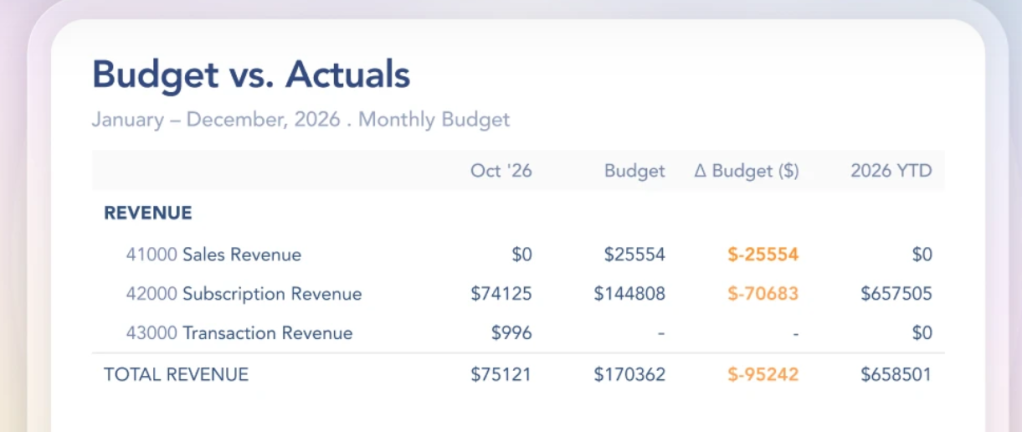
Digits keeps the user’s ledger current around the clock, so your budget vs. actuals is live, too, he says. Book a transaction and the comparison moves with it, immediately.
In his blog post, Seibert also touts the following:
- The full picture in one statement: Period budget vs. actual, year-to-date, full-year budget, remaining budget and percent of budget used, side by side.
- Variance your way: As a dollar amount, a percent, or both—for the period and year to date.
- The trend at a glance: Actual net income as bars against the budget line, period by period.
- Where to look first: Top Category Variances surfaces the categories furthest over or under plan.
- Fiscal-year aware: Year to date follows your fiscal year, not just the calendar.

“Budgets change, so Digits keeps every version of them. Each upload adds a new version, whether it’s the original plan, a re-forecast, or the board-approved number. You can name versions, switch between them, and compare any one to actuals. Digits follows the latest version by default and never overwrites your history,” he wrote. “Budgets also live next to your actuals: add Budget vs. Actuals to the P&L, drop budget statements into report packages, and export to PDF or Excel in one click. Because budgets follow your chart of accounts hierarchy, parent categories total their children automatically, the same way your books roll up.
“When the team needs to discuss a number, comments sit on the budget itself, and an activity log shows every upload, new version, and rename,” Seibert added.
Budgets is now available on Digits Pro: $250/month for businesses and for accounting firm clients. Pro includes everything in Core plus Budgets, Custom Reports, and Custom Dashboards, Seibert says.
More information about Digits Budgets can be found here.
Photo credit: Airborne Visuals
Sign in to get access to this free resource, and all of our whitepapers and reports.

Download this content today!
Register Now Already registered? Click here to Log In
Tags: Accounting, accounting firms, budgets, Digits, Technology