Review of QuickBooks Online - 2011
Intuit, Inc. - QuickBooks Online
800-286-6800
www.quickbooksonline.com
From the June 2011 Review of SaaS Accounting Systems for Small Business
Having just passed 250,000 users, QuickBooks Online is likely the most widely known web-based accounting system for small businesses, offering simplified management capabilities, payroll, invoicing, electronic payment acceptance, reporting and budgeting tools, with the ability to access the system anywhere and anytime. QuickBooks Online is available in three versions and is completely different from the installed version, providing different interfaces and capabilities that take advantage of the web-based nature of the program.
Best Fit:
Small businesses with only a few employees, primarily service-based or those with simple product/inventory needs.
Basic System Functions: 
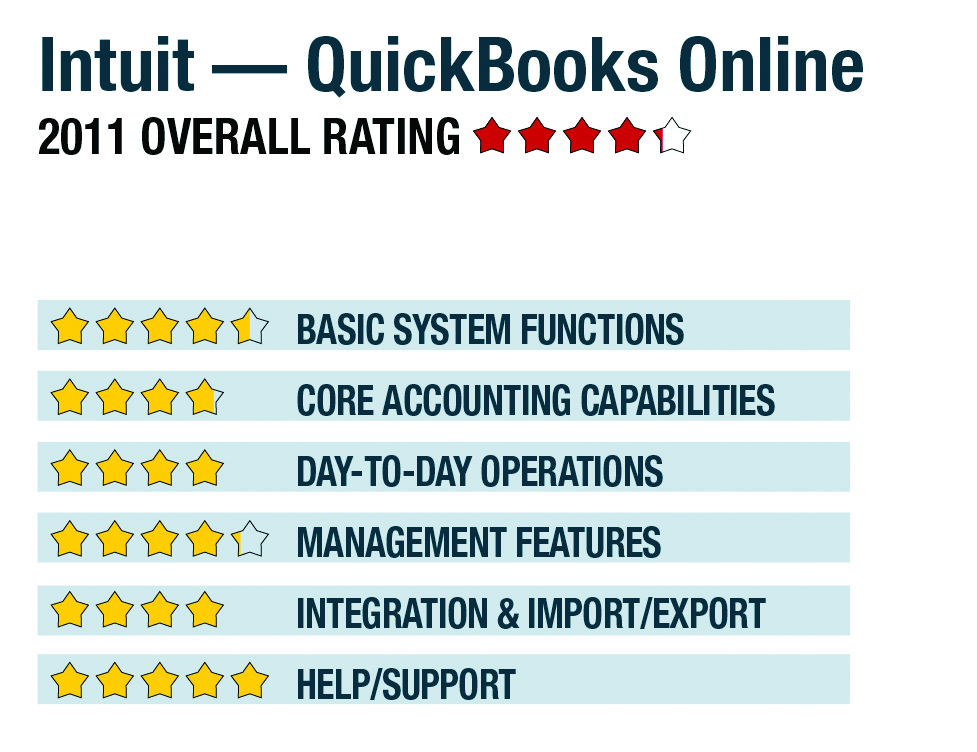
The three versions of QuickBooks Online (Simple Start, Essentials and Online Plus) have varying features and options, but they share the same general browser interface and menu structures. The more advanced Online Plus is reviewed here. The program works with both Mac and PC computers and supports all major Internet browsers. Navigation is simple and logical, opening into a home screen with tabs for accessing primary functions such as company, clients, vendors, employees, banking and reporting. This initial page also displays a welcome panel that offers assistance with a “Getting Started Guide,” Free phone support is available to guide new users through the setup process. While the home page offers additional links to common tasks and displays recent transactions, it is not really a dashboard, since it doesn’t offer quick views of key business indicators or items requiring attention. A customizable dashboard report called the Company Snapshot is available from the reports menu.
|
Navigation within the program is generally very simple, with each of the primary tabbed activity centers also offering submenus for related tasks. For example, the company tab offers access to the chart of accounts, recurring transactions, preferences, budgets and administrative program functions, while the client center includes a master client list, links to invoicing functions, payment receipts, charges, credit card acceptance utilities and other features. Menus can be customized somewhat to user preference.
The program doesn’t require knowledge of accounting or bookkeeping jargon, using terminology based on the industry selected during setup. The program offers template charts of accounts based on common business types. The feature set, however, is generally the same regardless of the type of business being managed with the program, providing primarily service-oriented tools, such as clock timers and the ability to move time into invoices. Options for companies who have inventory and manage projects are limited, and job costing is not supported. As a fully web-based system, it is usable on tablets and smartphones, with program apps for the iPhone, BlackBerry and Android devices (although some features are not available on the mobile versions).
- « Previous Page
- 1
- 2
- 3
- Next Page »