2011 Review of CCH Small Firm Services — Fixed Asset Manager for TaxWise & ATX

CCH Small Firm Services - Fixed Asset Manager for TaxWise & ATX
800-681-1750;
www.taxwise.com
800-681-1752; www.atxinc.com

From the December 2011 Review of Asset Management Programs

Best Fit:
Small to medium sized firms that are looking for an easy-to-use asset management system that provides flexible reporting for clients with evolving asset management needs, including multi-departmental and geographical locations.

Strengths:

  • Easy to use
  • Supports all common depreciation methods
  • Customizable reporting, including output to Word, Excel, PDF and Crystal Reports
  • Integration with TaxWise & ATX tax systems

Potential Limitations:

  • No RFID or barcode scanning integration
  • No fully custom depreciation books
  • Limited consolidation/mass asset action functions


The ATX and TaxWise Fixed Asset Manager programs, which are generally identical in features and are both offered by CCH Small Firm Services, are reviewed as one program for this section. The program is branded under both names to enable export of asset data into the respective tax program, thereby broadening each product line to include live and after-the-fact payroll, Payroll Compliance Reporting, trial balance and Client Accounting Suite, which is a write-up system for professionals. The Fixed Asset program provides support for any number of assets and unlimited clients. It can be used as a stand-alone product but is generally used in conjunction with one of the tax compliance suites.

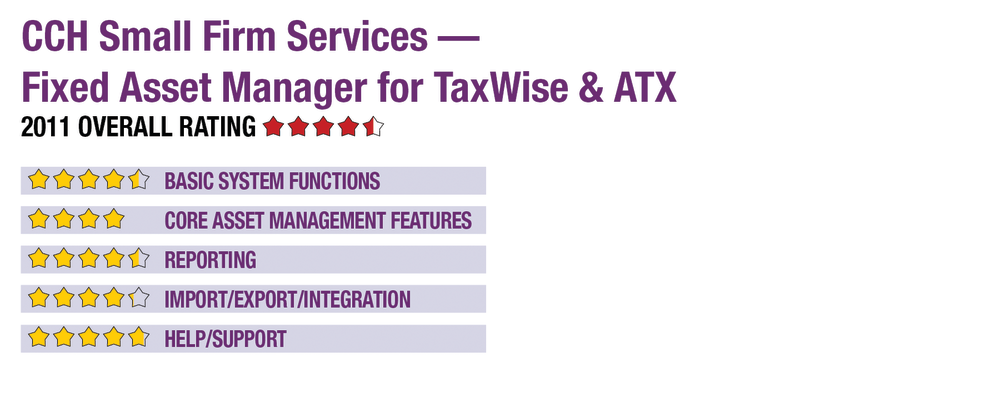
Basic System Functions - 4.5 Stars
Fixed Asset Manager runs independently of the tax programs, but does offer integration of client data, with the system’s interface opening to a traditional Windows environment with pull-down and icon menus at the top of the screen granting access to client files, import and export functions, security settings, reporting and preferences. Client and asset setup functions are generally intuitive, with guided processes simplifying entry and assisting in asset type and depreciation method selection. During setup, users also determine tax year data, mid-quarter conventions and other default information.

The main client list is presented as a spreadsheet that displays columnar information such as client ID, type of entity (based on tax return), and other information, and provides various search and sort options. Opening a client’s files brings up its asset list, another spreadsheet that this time offers columnar information on each asset, with asset cost, current year depreciation, in-service date and additional details. Selection of an asset opens up a window with a side-by-side view of the asset’s books, and tabs for moving between depreciation, asset history, Sec. 179, Vehicle/Listed, Disposition details and other information. Data can be entered directly onto these screens, with the resulting calculations applied in real-time to depreciation and other fields.

When networked, Fixed Asset Manager allows concurrent use by unlimited users; the system can also be used on stand-alone computers. It supports any number of clients with any number of assets, with the ability to group items by department, location or other custom method. The system offers basic user customization options and provides user-based password security.

Core Asset Management Features - 4 Stars
Fixed Asset Manager offers preconfigured books for federal, state, AMT, ACE and book, with a total of five books assigned to an asset at a time, and projected depreciation for the current and next years. It includes functions for easily handling asset acquisitions and disposals, including like-kind exchanges and splits, asset losses and installment sales.

The system offers a basic tool for adding multiple new assets, but cannot unsplit or consolidate the asset bases of multiple entities. Consolidations between sub entities of the same primary entity can be performed. Worksheets help with the processes of sales and acquisitions.

This content continues onto the next page...