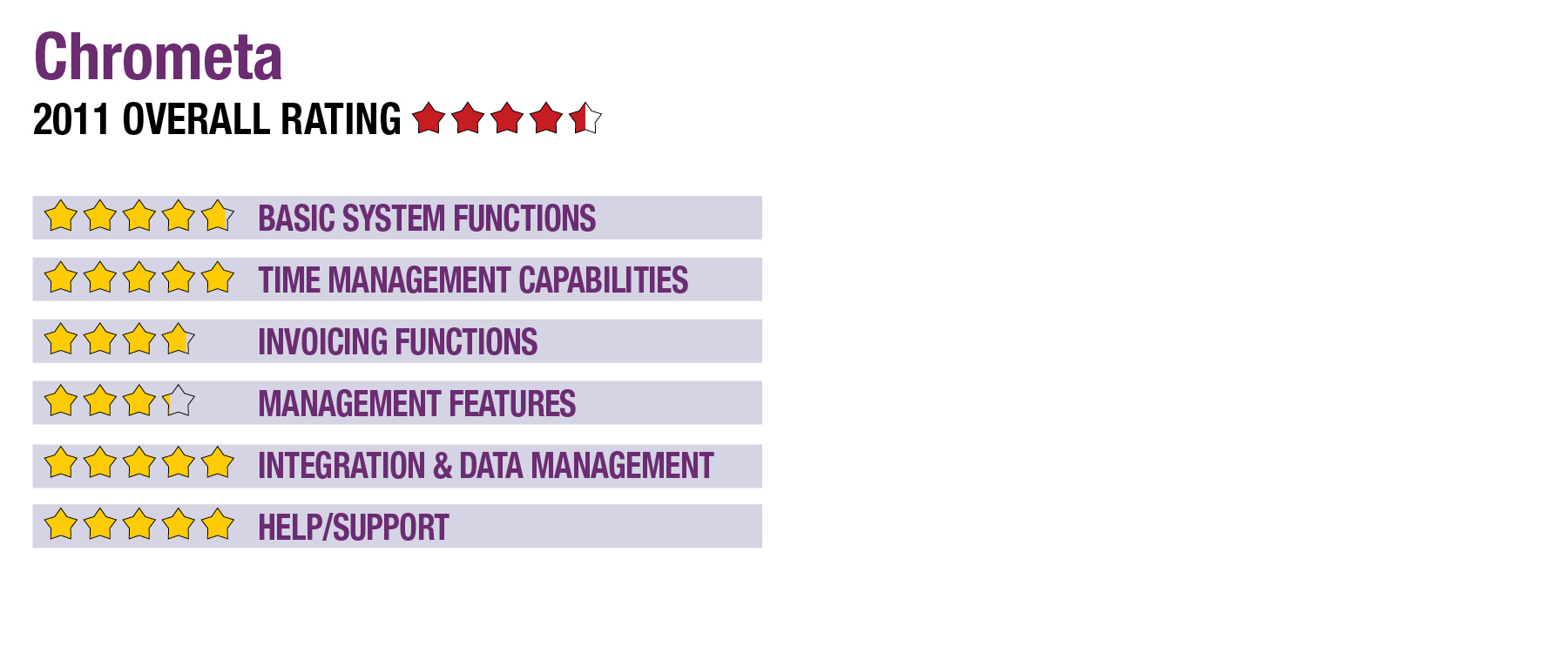
2011 Review of Chrometa
Chrometa
888-340-6425
www.Chrometa.com
From the Oct. 2011 Review of Time & Billing Systems.
Best Firm Fit: Small firms with simple billing needs, or firms of any size for timekeeping.
Strengths
- Innovative system for automatically tracking time.
- Integration with several accounting programs and other billing programs.
- SaaS software that can aggregate time from multiple PCs.
Potential Limitations
- Limited invoicing capabilities. Works best with an integrated application for these functions.
- No current application for tracking time on mobile devices.
Professionals that loathe taking notes or starting and stopping timers all day to log their time may find Chrometa’s unique approach to time tracking both refreshing and empowering. It allows a person to just focus on working while the program collects data on the amount of time each window is active. Traditional timekeeping methods struggle to keep up with today’s multitasking professional. Chrometa, on the other hand, effortlessly and automatically tracks the amount of time a user opens and responds to an e-mail for one client that interrupted the input of data in a tax software for another client, for example.
Chrometa does one thing extremely well: It tracks time. It offers few features on the billing side, but for firms needing more robust billing capabilities, Chrometa exports time in several formats and to many accounting and billing programs.
Chrometa’s value is larger than its ability to track chargeable time. For all computing activities, it answers the question, “Where did all the time go?” For instance, it brings self-accountability to a user who has no idea how much time he or she spends using social media.
Basic System Functions (4.75 Stars)
Chrometa comes in two parts: a locally installed application for recording data and a web-based product for categorizing time, viewing reports and exporting information to other programs. The data collector, available for both Windows and Mac, captures time tracked from activity on a computer and uploads it to a user’s web account. An icon on the taskbar provides options to launch Chrometa’s web application, upload data manually, adjust settings, pause time capturing or completely exit the program.
The web portion of Chrometa runs on HTML5, and requires the use of a compatible browser. Google Chrome and Mozilla Firefox are recommended. The web application opens the dashboard first by default, which shows a summary of a day’s active, away, and billable time, as well as the most frequently used applications. Chrometa’s web interface is intuitive, simple and uncluttered. The user navigates from one section of the web app to another through tabs that are always visible at the top of the screen.
Time Management Capabilities (5 Stars)
Chrometa tracks time completely in the background, allowing the user to focus on the task at hand instead of subconsciously thinking about the amount of time elapsed. The web application also provides the ability to manually add time entries. If a computer is left idle for a period of time, Chrometa prompts the user to log time while he or she was away. This setting can be turned on or off, and the number of minutes for Chrometa to count as idle time is customizable.
The web app shows a summary of time spent by program or by timestamp grouped by hour in chronological order. Users can categorize time based on clients and projects, or even designate a block of time as being personal. A different hourly billing rate can be assigned to each client or project, and away time can be split between multiple categories. Another powerful feature is the creation of rules, which can be used to automatically categorize time based on application name, window title or URL/file path.
Chrometa logs time based on the program’s window title, which works great with many tax and accounting programs that have the company or client name included in their titles. For example, Chrometa reports the total time spent on a specific QuickBooks company file as “ABC Company - QuickBooks: Premier Accountant.” For an Excel spreadsheet, it may display as “Microsoft Excel - ABC Company trial balance.xlsx.” This makes it easy to assign time to clients and projects.
- « Previous Page
- 1
- 2
- 3
- Next Page »