2011 review of Thomson Reuters — Practice CS
Thomson Reuters - Practice CS
800.968.8900
CS.ThomsonReuters.com
From the August 2011 Review of Practice Management Systems
Best Fit:
Firms wanting strong dashboards and Outlook integration, particularly those using other Thomson Reuters CS Professional Suite applications.
Practice CS, part of the CS Professional Suite from Thomson Reuters, provides resources for effective firm management that include time and billing, contact management and project management. Integration is the key to the success of the CS Professional Suite, and since Practice CS shares data with the other assortment of integrated applications from the suite, it can help firms streamline workflow and gain efficiency. Using the latest Microsoft .NET technology, Practice CS has a user-friendly and flexible interface.
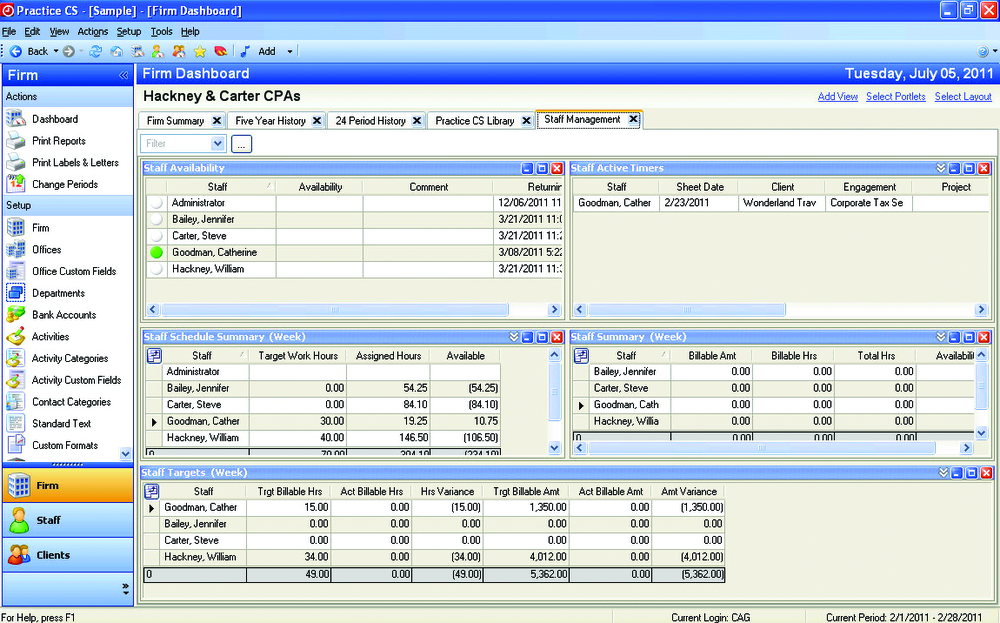
Highly emphasized in Practice CS is the use of digital dashboards. Much like dashboards in a car display critical information of its operations to the driver, the customizable dashboards in Practice CS provide real-time data to firm decision-makers about clients, staff and the firm as a whole to maximize productivity, improve client service, and gauge the firm’s overall performance.
|
The newest delivery option for Practice CS and the other CS Professional Suite products is a monthly leased SaaS model, including web hosting, which makes it accessible anywhere and anytime with a web browser and a minimal up-front investment. However, this review focuses on the installed desktop Practice CS product.
Basic System Functions: 
With an interface similar to the other programs in the CS Professional Suite, and a look and feel also familiar to users of Microsoft Outlook, navigation through the program is easy and intuitive. The navigation bar on the left side of the screen provides quick access to dashboards, while the top of the screen contains icons and pull-down menus. Like a web browser, there are buttons to go back to the previously viewed page, go forward, go to the home screen, refresh data, and choose from a list of favorites.
Time Management Capabilities: 
In Practice CS, time can be entered into a customized spreadsheet-like, data-entry screen, or time can be tracked and captured with a built-in desktop timer. Staff working on a computer remotely can enter time within the program; and with an Internet connection, the time can be sent back to the office with the click of a button. With Mobile CS, an app that makes data from the CS Professional Suite available on mobile devices including an Apple iPhone, iPad and iPod touch, users can enter billable time and expenses on these mobile devices as well as view projects, tasks, billing, A/R, and contact information while on the go.
The timer automatically starts when a program is launched from the project or task in the Practice Management screen and automatically stops when the program is closed. When Practice CS is used with other products from the CS Professional Suite, the program will automatically associate that time with the client that the user was working on in the suite’s other products. The program allows multiple timers to run at the same time.
With the Staff Management module, Practice CS is able to track accruable benefits such as vacation and sick time, as well as comp time benefits. Benefit requests can be forwarded to supervisors for approval within the program. Practice CS also tracks CPE hours as well as course information, type and other details.
Invoicing Functions: 
- « Previous Page
- 1
- 2
- 3
- Next Page »