2011 review of CaseWare International Inc — CaseWare Time 2011
CaseWare International Inc — CaseWare Time 2011
800-267-1317
www.caseware.com
From the August 2011 Review of Practice Management Systems
Best Fit:
Firms currently using CaseWare Working Papers.
CaseWare Time is a comprehensive practice management solution offering time and billing, project tracking, accounts receivable, and other tools that support the day-to-day management of a professional services firm, all in real-time reporting. Time is able to handle time sheets for an unlimited number of staff and an unlimited number of work codes and descriptions. With the ability to integrate with Microsoft Outlook, CaseWare Time can serve as an effective contact management system and provide features for easy client communication and marketing. CaseWare Time runs on Microsoft SQL Server, and will install SQL Express if the firm does not already have SQL installed.
Basic System Functions: 
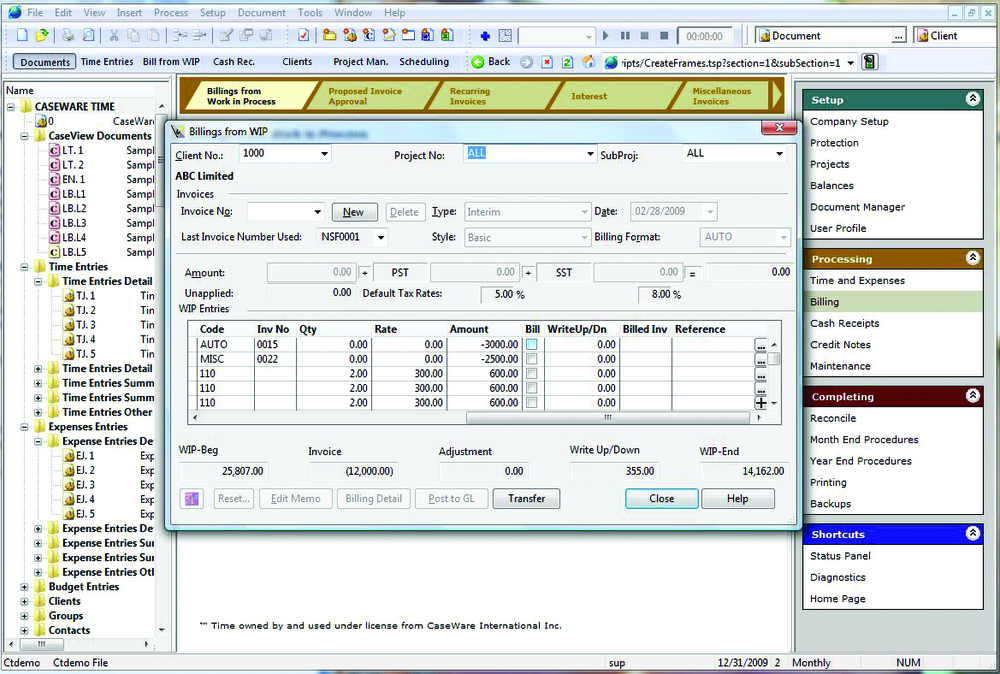
The Workflow layout, designed to guide users through their tasks, is composed of three windows: the Document Manager on the left, containing a list of documents in a Windows Explorer-type fashion; the Main Window in the middle, with data and links to program areas; and the Navigator on the right, displaying steps in the Workflow applicable to the user. The top of the screen contains familiar looking icons and toolbars, including one to start, pause or stop the timer, and browser-like buttons to go back, forward and refresh pages. All of these windows and toolbars can be resized, dragged and moved to accomodate a user’s personal preference.
|
Time Management Capabilities: 
CaseWare Time has a spreadsheet-style interface with columns to record many details, including work codes, client numbers and names, project numbers and subprojects, hours and memos. The time entry screen can show a “mini dashboard” summary of hourly totals for a period, such as daily, monthly and year-to-date. Using an optional add-on called Websheet, CaseWare Time users can enter, view and edit their time and expenses remotely on a web page formatted to fit the screen sizes of desktops, as well as browsers on either an iPad or a smartphone.
The program includes a built-in timer that, by default, is part of one of the toolbars at the top of the screen, which may be helpful to some users because the timer status is always visible when the CaseWare Time window is open instead of being a separate window that may be hidden behind it. The timer will not start until all of the details for the time are entered, forcing users to choose a client number and work code before recording time. By clicking on the record button in the timer, the program opens a popup window for entering an optional memo description and then saves the recorded time to the Time Entries dialog.
Time does not offer built-in HR and staff management features other than the ability to record nonchargeable work codes.
Invoicing Functions: 
After selecting a client and project number from pull-down menus in the billing screen, the user can check off time and expenses for billing, and has the option to allocate any write up or write down to a staff member or prorate it among the staff. A customized automatic numbering system can be set up for invoices. The program includes 200 reports that can be organized in hierarchical folders, making them easily accessible. Invoices can be opened in CaseView, an embedded word processor also used in the CaseWare Working Papers product, and be reworded, formatted and customized to the user’s satisfaction.
Management Features: 
- « Previous Page
- 1
- 2
- Next Page »