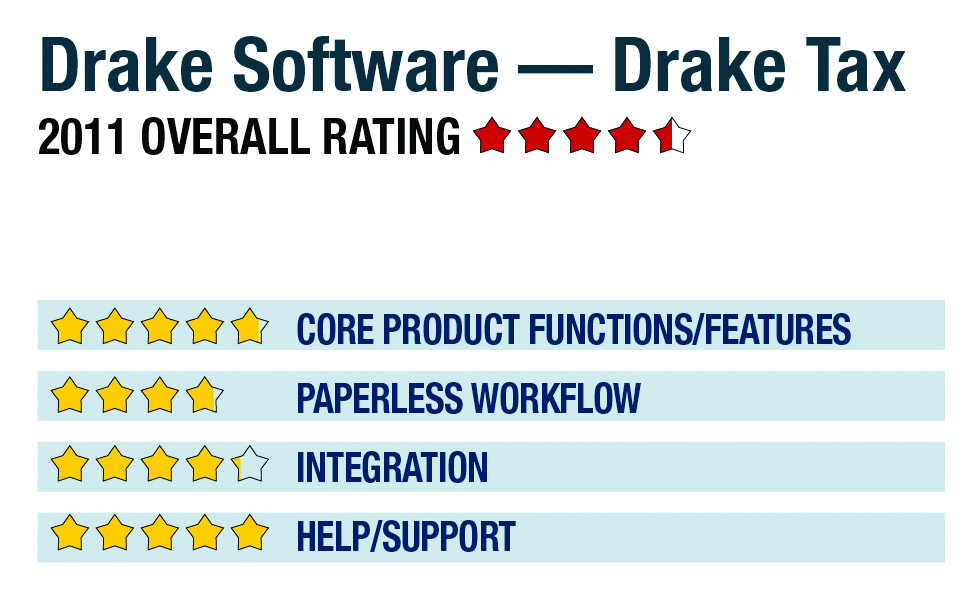




2011 Overall Rating 4.5
800-890-9500
www.DrakeSoftware.com
Best Firm Fit:
1040-focused practices looking to broaden their services with integrated write-up and tax planning options, as well as retail environments with multiple locations.
Strengths:
– Exceptional live support
– Affordable all-inclusive pricing includes all entities, states, e-filing, plus tax planning, document management & write-up with ATF payroll
– Multi-office manager sync system
– Free basic websites for firms
Potential Limitations:
– No client portals
– Limited document automation tools (scan & fill)
– Limited internal collaboration tools
Executive Summary & Pricing:
The Drake system provides virtually everything a tax practice needs at one simple cost, making it a good turnkey solution for new firms or those looking to enhance their tax services with planning, write-up, after-the-fact payroll and other offerings. The system is best suited to smaller and mid-sized practices primarily focused on 1040s, with some moderately complex returns, as well as a growing business client base. Drake also offers excellent program support and tax training options. The system costs $1,495, although various discounts are often available and early renewal pricing is under $1,095, making it one of the most affordable fully comprehensive professional tax suites on the market. Pricing includes any number of users within a practice. A pay-per-return model is also available, with each return costing $19, inclusive of federal and state e-filing.
4.75 – Core Product Functions/Features
product depth/multi-state
navigation/ease-of-use
support for special situations
electronic filing
3.75 – Paperless Workflow
paperless creation
paperless open items
access control for limiting access into returns
digital document storage/mgmt.
data import/export
4.25 – Integration
w/in Publisher’s own suite
w/tax research tools & guidance
w/other or external programs
w/external services
5 – Help/Support
online resource center
tech assistance availability
Downloadable program updates
Preferred SaaS route
Sign in to get access to this free resource, and all of our whitepapers and reports.

Download this content today!
Register Now Already registered? Click here to Log In
Tags: Software