



800-968-8900
CS.ThomsonReuters.com
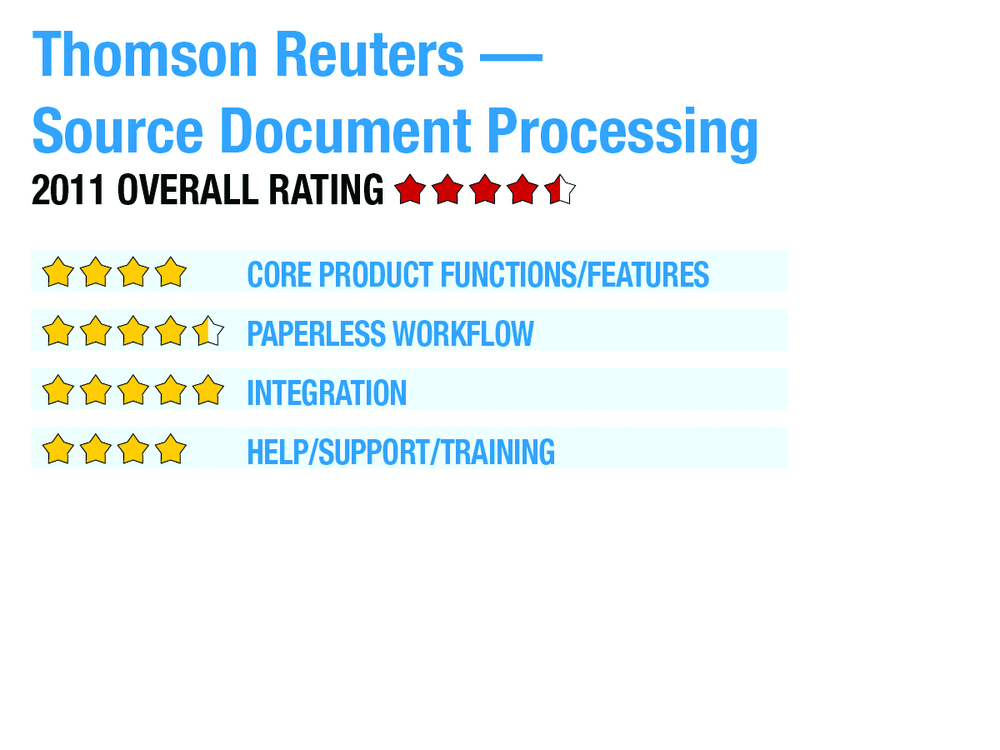
2011 Overall Rating 4.5
Best Fit
- Firms who use the related Thomson Reuters applications (FileCabinet CS and UltraTax CS). Note: FileCabinet CS is required for labeling and organizing. UltraTax CS is required if firms want to take advantage of the data extraction feature.
- UltraTax CS users who have clients with significant securities trades or source documents.
- The least expensive scan, organize and populate tool reviewed here, at $6/return.
- Strong integration throughout the CS Professional Suite applications, including automatic search and import of tax data from the payroll, write-up and flow-through entity tax preparation applications.
- Requires firms to use FileCabinet CS, which must be used instead of Adobe Acrobat to annotate and reference source documents.
- Unlike many of its competitors, Thomson Reuters does not sell an Adobe Acrobat extension to assist practitioners with creation of workpapers.
- The application does not support any third-party solutions for document management or tax preparation.
Strengths
- The least expensive scan, organize and populate tool reviewed here, at $6/return.
- Strong integration throughout the CS Professional Suite applications, including automatic search and import of tax data from the payroll, write-up and flow-through entity tax preparation applications.
Potential Limitations
- Requires firms to use FileCabinet CS, which must be used instead of Adobe Acrobat to annotate and reference source documents.
- Unlike many of its competitors, Thomson Reuters does not sell an Adobe Acrobat extension to assist practitioners with creation of workpapers.
- The application does not support any third-party solutions for document management or tax preparation.
Executive Summary & Pricing
At $6 per return per year, the UltraTax CS Source Document Processing Service is one of the least expensive tools reviewed. Thomson Reuters also offered UltraTax CS users a “free day” during March 2011, where users could try out the service by processing as many returns as they could submit during that day.
The UltraTax CS Source Document Processing Service is the CS Professional Suite application from Thomson Reuters for scanning, organizing and populating data from tax forms into UltraTax CS.
Core Product Functions/Features – 4
Paperless Workflow – 4.5
Integration – 5
Help/Support/Training – 4
Sign in to get access to this free resource, and all of our whitepapers and reports.

Download this content today!
Register Now Already registered? Click here to Log In