



800-272-9908
Initially developed over 30 years ago, Contractor Essentials from CUC Software has provided construction and contracting businesses with an industry-specific product that was designed by a contracting firm. A laundry list of industry-specific modules within Contractor Essentials makes this product an excellent choice for contracting businesses of any size.
BASIC SYSTEM FUNCTIONS
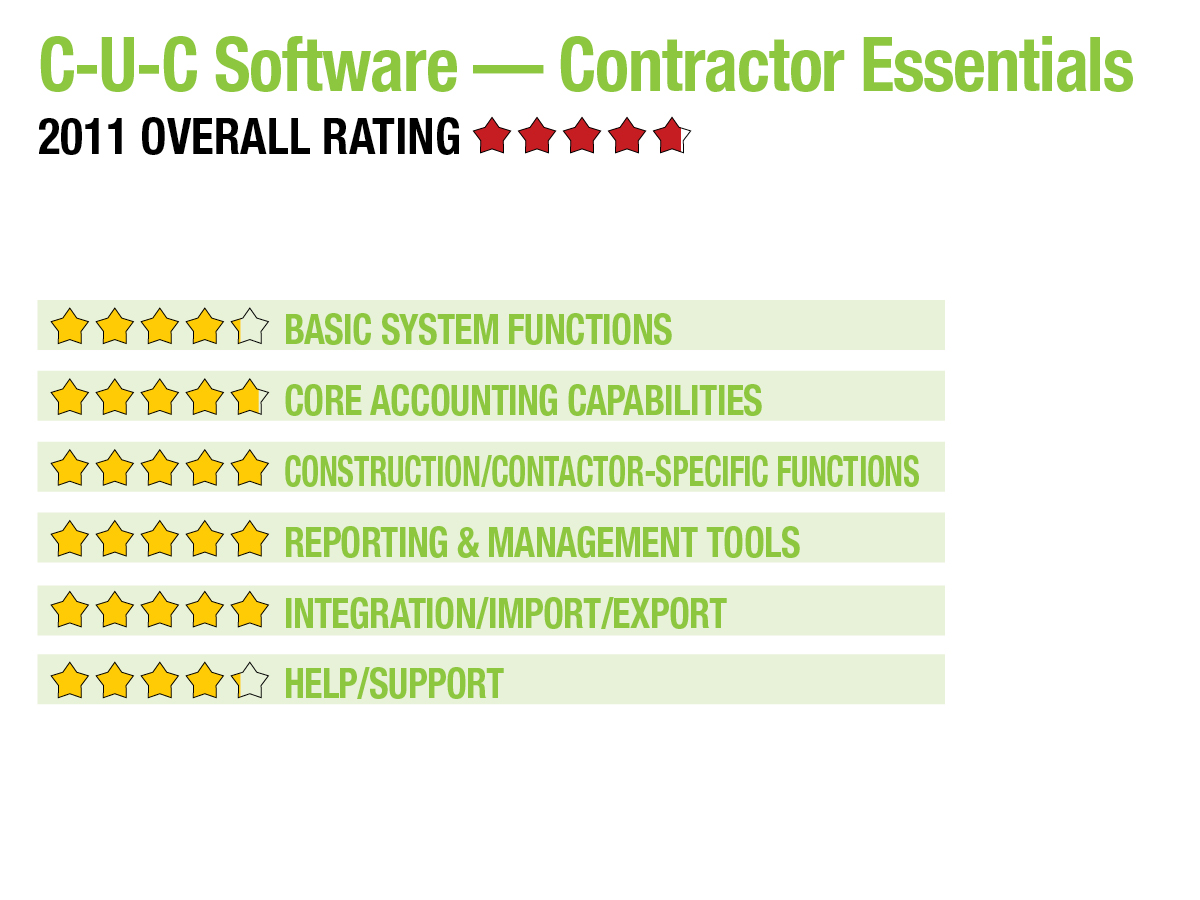
Contractor Essentials contains an easily navigated user interface with a standard drop-down menu at the top of the screen. A vertical menu to the left allows users to quickly access frequently used functions and daily tasks. Contractor Essential’s data-entry screens are easily navigated and contain good lookup options as well as tabs to related module options. Areas such as My Tasks can be utilized or simply hidden if not in use. The Critical Performance Measures module provides users with the ability to access specialized reports that categorize and define company and industry benchmarks. Field users can easily access Contractor Essentials. Contractor Essentials works on a Windows platform and will work with both Windows Vista and XP for workstations, with Windows 2000+ needed for server use. 4.25
CORE ACCOUNTING CAPABILITIES
Contractor Essentials contains all the necessary financial modules in its core product, including GL, AP, AR and Payroll. Functions found under the GL module include asset management, banking and budgeting. The AP module allows users to enter recurring invoices and easily integrates with the Purchase Order (PO) module to effectively process all POs entered into the system. Invoices can be paid using a variety of methods including check, credit card or direct deposit. The AR module provides users with the ability to enter repetitive invoices to customers and maintains a comprehensive customer history. Contractor’s Essentials payroll module supports multiple pay rates for each employee, handles union reporting options, and can easily process certified payroll.
Contractor Essentials also offers additional accounting/financial modules such as Inventory & Inventory Kit Assemblies, Estimating, Point of Sale, Progress/AIA Billing, and Critical Performance Measures (CPM). Solid audit trail capability lets users track all transactions in the system, and the multi-level system security provides users with the ability to assign system access based on the primary menu, along with both first- and second-level menus. An optional password protection feature is also included. 4.75
CONSTRUCTION/CONTRACTOR-SPECIFIC FEATURES
Contractor Essentials contains both project and material estimation capability. Users can assign percentages to job estimates, edit an existing estimate and enter default information that can be easily overwritten, if necessary. The Material Estimate module provides users with the ability to convert bids to jobs, and can import bids from secondary appliances such as laptops, if needed. Existing bids can also be merged. All job information can be easily tracked by project managers, with the ability to access complete job detail, including job cost by phase, materials to jobs totals, and both progress billing and time & material billing. Change orders can be entered and tracked as needed, with the necessary adjustments made to subsequent invoices.
Contractor Essentials also offers excellent customer, vendor, employee and subcontractor tracking and management with a complete history and analysis available along with built-in tools designed to track customers and potential sales, with new marketing interface screens available in this latest edition. The Notes/Files option provides a venue for users to record all vendor/customer contact and maintain a file for each interaction. Employee history is easily available to all users and can maintain separate classifications for all employee types, with the appropriate skill or trade level noted. An optional Inventory module contains several essential features, including serialized inventory, as well as the ability to assign bar codes to all inventory products for easy tracking. Adjustments can be entered as a cost adjustment or a count adjustment. An Inventory Kit Assembly module is available, as well. The Purchase Order module works in tandem with the AP module to funnel any POs directly into AP for easy processing. The Tool Management module provides users with the ability to check out tools and track usage, and the Vehicle Maintenance module tracks all associated costs on each vehicle used along with a maintenance schedule.
Another great tool, My Appointments provides users with an interactive screen to record current job information, as well as track scheduled appointments and any sales leads. Users can now schedule repetitive appointments, as well, with the ability to assign priority to each appointment.
An excellent Service Management and Dispatch module allows users to easily schedule service calls. The included phone interface displays all customer information on the dispatch interface screen. The service management module also maintains a complete history of every piece of equipment, making it easy for the dispatcher to access the information when scheduling a service call. The dispatch module also integrates with the E-Service module, which allows dispatchers to send work orders to field technicians electronically. It also includes integration with Map Manager, which provides directions for all calls. The Equipment Tracking module maintains detailed information on all related equipment, including installation dates, warranty information and service history. 5
REPORTING & MANAGEMENT TOOLS
Job reporting capabilities are excellent in Contractor Essentials. Users can easily access complete job information including budget versus actual costs, estimated hours to complete, and any related labor and maintenance costs. Contractor Essentials produces AIA billing, and the Critical Performance Measures provides useful industry information regarding specific target areas. Contractor Essentials can create custom forms including work orders, invoices, statements and checks. Employee and subcontractor time and labor costs are easily tracked in the job costing module and are immediately recorded in the respective payroll module. 5
INTEGRATION/IMPORT/EXPORT
All Contractor Essentials modules are designed for seamless integration. Along with the standard system, Contractor Essentials offers a long list of add-on modules including Service Manager, Marketing, Task Master, Point of Sale, Refrigerant Tracking, In House Manufacturing, Flat Rate Interface and Tool Management. Contractor Essentials also offers excellent integration with all Microsoft Office products including a direct interface with Word and Outlook. 5
HELP/SUPPORT
Contractor Essentials provides basic Help functionality, which could be enhanced for greater usability. Various support plans are available, with basic support available for around $1,900 for one to six users. The support agreement includes toll-free support and all product upgrades as they become available. Users can also opt for per-call support. Contractor Essentials offers onsite support as well as classes at their corporate headquarter. They are also ramping up their online support options offering daily tips on both Facebook and Twitter. 4.25
SUMMARY & PRICING
Contractor Essentials from CUC Software starts at $10,685 for one to three users. The basic system includes GL, AR, AP, PR, Job Costing, Service Manager, Inventory and Equipment Tracking modules. Additional add-on modules are available, as well. Contractor Essentials is designed specifically for the service contractor, and it shows. Along with the core system, contractors can pick and choose the modules they need for their business type. Easy navigation and system setup make Contractor Essentials a solid investment for any type of service contractor.
2011 Overall Rating 4.75
Best Fit:
A laundry list of industry-specific modules within Contractor Essentials makes this product an excellent choice for contracting businesses of any size, particularly service contractors.
Strengths:
- Built-in project & material estimation capability
- Excellent customer tracking & marketing options
- My Appointments provides interactive screen for recording current job information, as well as tracking scheduled appointments & sales leads
- Strong inventory functionality
- Excellent tools for dispatchers
- E-Service module allows dispatchers to send electronic work orders to field technicians
- Solid list of available add-on modules
- Utilizing social media like Twitter & Facebook for daily tips
Potential Limitations:
- Website presence could be stronger
- Limited Help functionality
- Custom report options limited
Product Delivery Methods:
_X_ On-Premises
___ SaaS
___ Hosted by Vendor
Sign in to get access to this free resource, and all of our whitepapers and reports.

Download this content today!
Register Now Already registered? Click here to Log In