
Using Your iPad for Business: Greater Portability, Flexibility, and Organization. Fewer Trees.
The iPad is an invaluable business tool if properly used. The first step is to realize it is not a replacement for your laptop or desktop computer...
Apr. 04, 2012
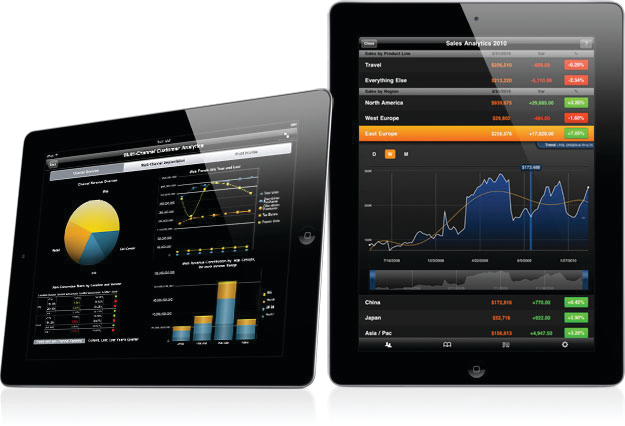
The iPad is an invaluable business tool if properly used. The first step is to realize it is not a replacement for your laptop or desktop computer(s) — although there are some things it does better. The iPad is portable, powers up and runs fast, and has a long battery life. Generally, this allows the iPad to excel in the following business computing functions.
Note Taking
Save a tree. Legal pads have long been a standard in board and conference rooms. Thanks to the iPad, they are facing extinction. Before the iPad, notes were a disorganized collection of illegible yellow pages filed away somewhere in a cabinet, rarely available when needed most. With an iPad, your notes go with you everywhere. Using an application called Evernote (free), notes sync to the cloud and are accessible on virtually any device that can access the Internet. Evernote also has software for the MacBook and PC that allows you to quickly sync notes between devices. The interface allows you to thoughtfully arrange notes (say, by client) and segregate work and personal to-do lists. One additional tip: get a Bluetooth keyboard. A company called Zagg makes several great ones that double as cases.
Paperless Document Review
Save another tree. Consider your iPad as your new printer tray. Anything you would have printed out before, you can review “paperless” on your iPad. Pick up a stylus (a pen designed to write on touch screens) and hand write commentary directly on a PDF document using an app called GoodReader ($5). GoodReader lets you pull in documents from iTunes, email, or the cloud; write comments on them; then save or send back through email or sync to the cloud.
“Consider your iPad as your new printer tray. Anything you would have printed out, you can review on your iPad.”
There are several good competitor apps, such as iAnnotate and PDF Expert, with similar features in the same price range, so check out the features and user reviews. Whereas Evernote has its own cloud server, most PDF reader apps rely on a third-party cloud app. I use Dropbox (first 5GB free) as a clearinghouse for draft documents that will ultimately be stored on my work network or personal computer once they are finalized. Dropbox is also great for merely transferring documents between devices. Like Evernote, Dropbox has software for the MacBook and PC that speeds up the syncing process.
Remote Desktop
The iPad is a consumption device. It is not meant for heavy processing or mass storage. Since your iPad won’t replace your other computers, you will naturally still want to use and access them. You just don’t want to have to carry them everywhere you go. No worries — this is why you have an iPad. With an Internet connection and a remote desktop application like Gotomypc, Splashtop, Logmein, or Screens, you can gain access to your other computers remotely. These apps range in price, so some due diligence is required. Focus on compatibility (are your other computers Mac? PC? both?) and differences in features. Most of these apps allow for file transfer. You could also use email or a Dropbox account to transfer documents.
If your company has a Citrix server, you’re in luck. There is a great app called Citrix Receiver (free). This app works well, and is even better when paired with a Bluetooth keyboard and an iPhone. The “Wireless Trackpad” feature allows you to turn your iPhone into just that — a wireless trackpad paired with your iPad. You may also need Cisco AnyConnect (free) if your office requires a VPN connection to get into your network.
Mobility
“One feature that is often overlooked allows you to use your iPad as a second display.”
Except for talking, the iPad will handle most tasks better than a smartphone. This includes emailing, web browsing, and social networking. Check out apps from LinkedIn and NewsGator (both free) to stay plugged into your business networks on the go.
One feature that is often over looked allows you to use your iPad as a second display. With a dual-display app, connect your iPad to the same wireless network as your laptop and enjoy two screens connected wirelessly. You can extend or clone your desktop, which is great on the road, and if you already have two screens in your office, why not add a third? For dual screening, try Air Display for your Mac and MaxiVista for your PC. Both are around $10.
Travel
An iPad with Bluetooth keyboard fits on any tray table with room to spare. Download a few documents prior to takeoff to stay productive while disconnected from the Net (unless you are fortunate enough to get a wifi-enabled plane). If you look forward to a break from work on your flight, access your iTunes library and enjoy an ibook, movie, or music. The iPad will also handle movies ripped from DVDs or downloaded from websites like Amazon. All you need is an app to play them. Try out Azul ($0.99).
If the hotel cable is too basic, use the iPad to stream movies on apps from Netflix or Hulu. There are also apps available for watching live or streaming TV, such as ESPN, Comcast’s Xfinity, and ABC (all free). However, the ultimate TV app is Slingbox ($30), which provides a portal to your own home cable channels and DVR anywhere you have an Internet connection (additional hardware required).
To stay up on news and current events, download Flipboard or Zite (free). Similar to Pandora (a free music app), these apps push news to you based on your preferences. You rate stories thumbs up or down and the app learns to send you customized content. A number of magazines and newspapers are also available for download, either in the iOS Newsstand, or in a stand-alone app (e.g., the Wall Street Journal has its own app).
“The first step is to realize that your iPad is not a replacement for your laptop or desktop computer. Use your iPad as a complement to your existing computer(s) and you will get the most out of it.”
The Final “Evernote” on iPads for Business
Use your iPad as a complement to your existing computer(s) and you will get the most out of it. Try out a few of the above functions and improve your work quality of life. Instead of work/life balance, you will be practicing work/life integration.
Andrew Rouse is a Senior Manager in Blackman Kallick’s Insurance Practice. For more information contact Andrew at arouse@BlackmanKallick.com or 312-980-3236.