
Technology
PDF Tools for Tablets and Other Mobile Devices
Column: Monthly Micro Apps
Mar. 03, 2012
Many practitioners are using tablets, smartphones, and other mobile devices in their practices. Although commercial software publishers are extending their offerings to include apps for these devices, many of the mobile business tools available for professional accountants offer very limited functionality. A good example of these constraints is evident in the wide range of PDF applications available for tablet PC’s.
The PDF apps available for mobile devices are generally developed by independent developers, and have a much more limited set of functions than traditional PC-based tools. The author has personally installed at least eight PDF tools over the last two years, and is still looking for a better solution for mobile PDF annotation. My purchases can be classified into a number of categories, including:
- PDF Reader Only (Adobe Reader, DataViz Documents to Go, and Google Docs)
- PDF Creation Only (Adobe Create PDF, PDF Reader Pro Edition, PDFScanner)
- E-Signature Applications (DocuSign Ink, SignMyPad)
- Light Editing Tools (ezPDF Reader Pro, iAnnotatePDF, GoodReader)
While none of these apps provide a single comprehensive document creation, rearrangement, annotation, and approval tool, users can use apps to meet most of their mobile PDF requirements.
PDF Readers
There are a number of apps which read or create PDF files. These tools basically display the electronic document as formatted, and do not permit the user to make notes, rearrange pages, or otherwise make changes to the file.
Some tools include a feature called reflow, which helps overcome the small screen size of the device by reorganizing the text in a single column, screen-optimized layout. Documents rendered to PDF electronically using tools like Acrobat Distiller or PDFMaker on Windows can generally use these tools, however, scanned images stored in PDF files generally cannot be reorganized to make them easier to see on a small screen.
Some PDF readers also allow users to complete electronic forms on mobile devices, however, many tools to not support this functionality. There are few, if any, tools which will allow creation of basic PDF forms on a tablet. Firms who would like to use tablets for client interviews should test their applications thoroughly to ensure that data can be collected, retained, and transmitted in an efficient and secure manner, as poorly deployed solutions can actually reduce the productivity of teams.
PDF Creation
Tools for creating electronic documents can generally be classified as scanning tools (which capture and present an image of a document) or rendering tools (which arrange characters, pictures, and other items in a manner similar to how it would be printed on paper), and both are available for mobile devices. A popular scanning app such as PDFScanner can utilize the built-in camera on mobile devices to take a picture of a document. While the quality and image format of the resulting file will not rise to the quality of a document captured with a scanner, the convenience of anytime, anywhere scanning is appealing to many users. A tool like Adobe CreatePDF for mobile will convert many common Office file types into searchable electronic documents, but will not enable any editing of the resulting files.
E-Signature Apps
Banks, real estate agents, and insurance companies are all migrating aggressively to electronic signature platforms like RPost, DocuSign, and EchoSign to reduce the need for documents to be printed and then scanned to capture an approval. Although some documents (most notably IRS Forms 8878 and 8879) require manual signatures[1], many common documents such as contracts, engagement letters, and audit confirmations can be electronically signed in a manner which is binding in state and federal courts.
Some approaches (such as RPost) use web-based tools and do not require anything to be installed on the local device, but other systems such as DocuSign require the installation of a supporting application for a document to be electronically signed. There are some more basic applications such as SignMyPad Pro which utilize the maker’s finger (or a stylus) to create a signature on the device’s touch screen.
Light Editing Tools
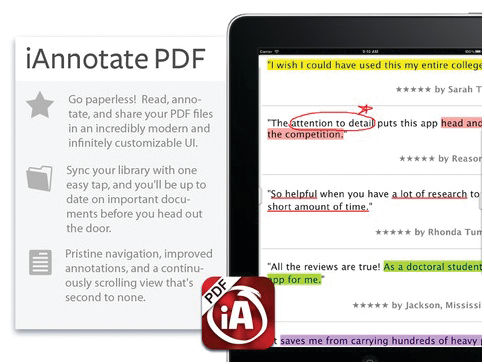
The most commonly requested PDF Apps are the ones used for light document editing. My research reveals at least three tools which can be used to mark up existing PDF files: ezPDFReader Pro (Android), iAnnotate PDF (iOS only), and GoodReader (iOS only). The files can be marked with highlighting, lines, stars, pop-up comments, and some even include the ability to insert shapes and text boxes.
[Figure 1: iAnnotate PDF allows users to mark up Adobe PDF documents on an iPad.]
Although these tools will not replace the need for Adobe Acrobat on a personal computer, they bring some basic capabilities to mobile devices. The features of each of these apps vary significantly, and are frequently updated, so users should test the capabilities of each app thoroughly before deploying them in a production situation.
The market for mobile PDF apps is changing rapidly, and although there is not a single solution which incorporates all of the functions needed by mobile professionals. A number of inexpensive solutions are available which perform basic tasks, and users who need more capabilities may need to use Adobe Acrobat on a personal computer until apps are available which emulate these capabilities on common mobile platforms.
[1] Source: IRS Pub 1345, Rev. 03-2009, Pg. 27:[A practitioners permitted use of a facsimile signature] “does not alter the requirement that taxpayers must sign Forms 8879 and 8878 by handwritten signature.”(emphasis added)