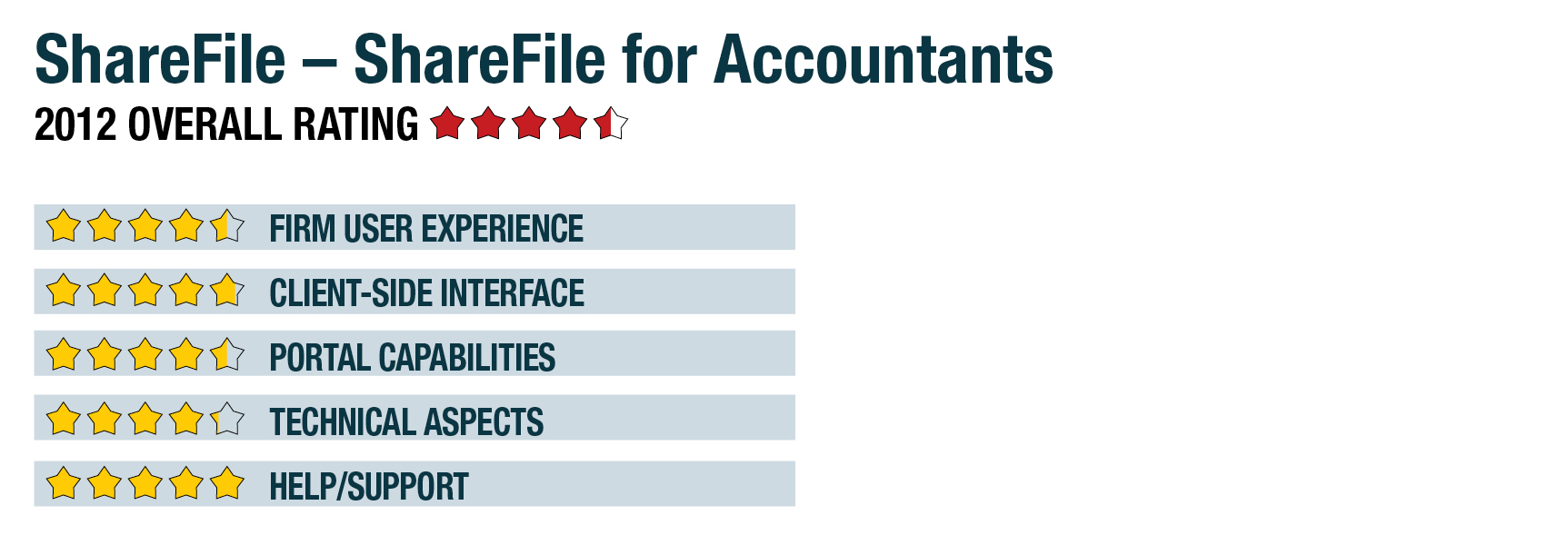
2012 Review of ShareFile – ShareFile for Accountants

ShareFile - ShareFile for Accountants
800-441-3453

www.ShareFileCPA.com

From the January 2012 Review of Client Portals.


Best Fit:

Accounting practices wanting a simple, yet secure method of sharing files with clients and allowing them to upload files to the firm.

Strengths:

  • Firm branding and the ability to place a login field on firm website
  • Sharing of files two ways between client and firm
  • Multiple users allowed at each client with different access rights
  • Dependable hosting, security and uptime
  • Outlook plug-in for quick secure sharing with any email recipient

Potential Limitations:

  • Doesn’t directly integrate with professional accounting programs but does offer indirect integration tools through drive mapping and sync.
  • Limited integration with other productivity applications


ShareFile is one of the most widely known independent developers of online file sharing and collaboration tools, with more than 17,000 businesses and 3 million individual users in 100 countries. The system offers variations for several industries, including the ShareFile for Accountants version, which is based upon the Enterprise version but with greater support and utility for the needs of accounting professionals serving multiple business clients. This system includes integration and syncing with outside programs, offers multiple mobile apps and desktop tools, and includes security and compliance capabilities that match or exceed the requirements of the profession.

Firm User Experience - 4.5 Stars

Initial setup of ShareFile is guided, with prompts asking for basic firm information and then the system opening into a very clean and easy-to-understand browser interface that defaults to a list of client folders. These folders can each contain additional subfolders, thus allowing firms to segregate shared items by engagement type, year or a client’s departmental structures. Additional components of this screen include text links to manage users, send files, request files, settings and the administrator panel, as well as icons for moving to the File Box, sending messages to the recycle bin and a customizable favorites function.

Firms can easily add their own branding elements to both the firm view and to what the client sees, including logos and creating custom subdomains from which all users access the system (such as, https://YourFirmName.sharefile.com). The file-sharing system is centered around the firm, with the number of users based on the version being used (the Accountants version includes 20 firm staff, but more can be added), and the ability to add any number of client portals, with any number of users at each of the clients. Each staff user and client user can be given varying access rights and permissions, including each of the users at the same client. The system does not offer the ability to create multiple clients at the same time, but management tools make it easy to adjust user settings and perform other functions across multiple client portals. As an alternative to the web-based portal view, a desktop widget is available to quickly upload, download and manage files without using a web browser.

An additional tool allows for the creation of non-firm users who can access multiple client portals, such as business owners with multiple entities, or other financial advisors or bankers with whom the firm and clients want to share specific files, such as financials. For all users except the top administrator, permissions are granular and can extend to the ability to upload or download items with or without alerting other users, as well as the ability to access subfolders. When initially signing onto their portal, users are required to change their password from the randomly created one.

All data is encrypted at the time of uploading and at all times while it is hosted. ShareFile stores its data using two of Amazon’s web services datacenters in the United States (on the east and west coasts), which are SAS 70 audited. This meets or exceeds all state and federal data security regulations. The company doesn’t traditionally guarantee uptime on its user agreements, but can do so when requested. During the previous 12 months, they reported uptime of 99.99 percent, which included scheduled maintenance.

This content continues onto the next page...