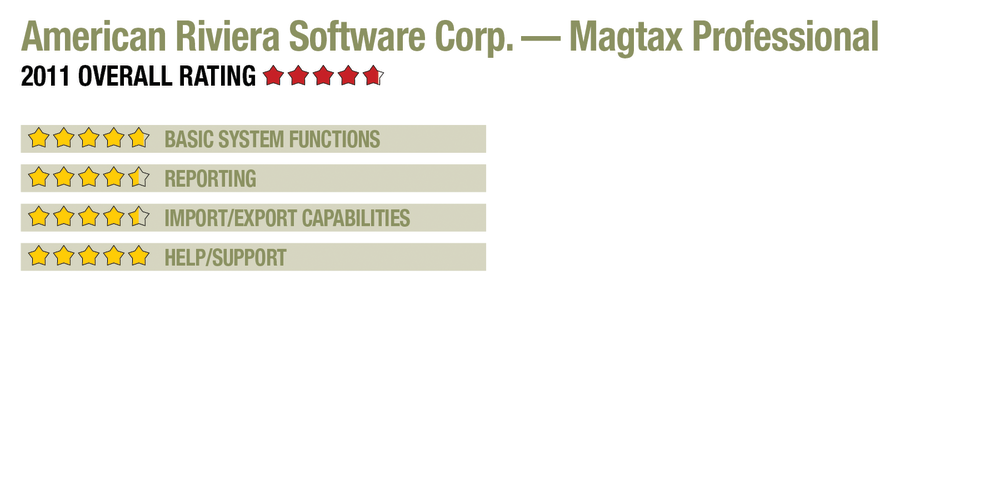
2011 Review of American Riviera Software Corp. — Magtax Professional

American Riviera Software Corp. — Magtax Professional
805-504-1366
www.magtax.com

From the Oct. 2011 Review of W-2 & 1099 Compliance Systems.

Best Fit: Firms managing year-end compliance for multiple businesses, with built-in electronic filing for federal and supported states.

Strengths:

  • Comprehensive forms, reporting capabilities.
  • Output to various file formats.
  • Excellent QuickBooks integration.
  • Strong Help utility/assistive features.

Potential Limitations:

  • No built-in invoicing functionality.
  • Does not provide 940-series forms.


Magtax is designed as a multi-company year-end compliance system for professionals managing these processes for their clients. It is available in two versions, Standard and Professional, with the latter version offering more comprehensive forms support for all W-2, 1099, 1098 and 1042-S filings. The program is installed on a workstation or server, provides direct integration with QuickBooks, and offers a remote client data import utility.

Basic System Functions  (4.75 Stars)

Magtax opens to a comfortable interface, with the Dataset Manager acting as the client/payer selection screen. This screen displays general data and file location information, along with tabs for quickly accessing e-file generation tools for submitting forms to the IRS, SSA, and state and local governments. Additional tabs show files that are ready to file as well as previously filed information returns. A wizard helps with initial setup of payer information, including contacts, W-2 defaults, 1042 defaults, Maryland-specific information and data for corrected forms.

When working within client company files, the system offers additional menus at the top of the screen, allowing users to quickly access existing forms, edit or enter new ones, or import data from QuickBooks. Quick print functions and histories can also be used, and icons offer “Getting Started” tips, pointers on new features, and the ability to update the program from the vendor’s website. Recipient selection lists are separate for each entity type. The W-2 list displays summary information for all recipients, sortable by name, GL account, wages, tax and each individual form field. Users can search by column. The 1099 list offers similar summary data overviews and sort-and-search functions, along with tabs for viewing recipients of each type of 1099. New forms can be easily added using either a form replica view or the QuickAdd screen. These client management tools, along with batch printing and other features, provide excellent user navigation and reporting options.

This review is of the Professional version of Magtax, which supports up to five concurrent users, and is designed to be installed locally. However, it can be hosted by third-party ASPs for firms with remote access needs. The system can be used to manage any number of payer entities, with any number of recipients each. Magtax also offers consolidation features that enable users to quickly combine data from multiple divisions or sub entities that file as a single entity, thereby preventing multiple 1099s or other forms from being processed for the same recipients.

Reporting  (4.5 Stars)

Magtax includes free electronic filing to federal and state agencies, and can export data into formats generally accepted by local taxing jurisdictions that accept electronic filing. The system also offers printing to either preformatted stock or plain paper, with support for forms W-2 and W-3 (with corrected forms), as well as forms W-2G, 1098, 1098-C, 1098-E, 1098-T, 1096, 5498, 1042-S and the following 1099 versions: Misc, Div., Int., B, C, G, R and S. W-2 recipients can have multiple state reporting. The system does not offer forms in the 940 series.

This content continues onto the next page...