2011 review of CCH, A Wolters Kluwer business — ProSystem fx Practice Management


CCH, A Wolters Kluwer business — ProSystem fx Practice Management
800-739-9998 opt. 1 
www.cchgroup.com

From the August 2011 Review of Practice Management Systems

Best Fit:
Firms wanting powerful time, project, marketing and client management features, particularly those using other components of the ProSystem fx Suite.

The ProSystem fx Suite from CCH offers an integrated set of income tax, accounting and workflow software designed to streamline information sharing and productivity across all applications. The practice management piece provides tools for effective tax and accounting firm management and includes functionality for timekeeping, billing, accounts receivable, project management and marketing.

ProSystem fx Practice Management, with a foundation built on .NET technology, is sold in three different editions: the Basic and Office editions run on Microsoft SQL Express or Standard database, and the Enterprise edition runs on Microsoft’s Standard or Enterprise SQL database.

Strengths

  • Strong integration with ProSystem fx Suite, Sage Abra Payroll, and Sage MAS 90, 200 and 500
  • Great features for tracking marketing & prospect information
  • SaaS version available
  • Business Intelligence module available

Potential Limitations

  • Users have to update the program manually
..

This year, CCH launched ProSystem fx Practice Intelligence, which takes the data from Practice Management and puts it into a graphical interactive dashboard. This business intelligence software enables firm owners to analyze financial performance at a step above the dashboards provided with the software. Since it has drilldown capability and can instantly display data by partner, department, location and client name, Practice Intelligence has proven to be particularly helpful for mid and large multi-partner firms. (ProSystem fx Practice Intelligence is an add-on product that is sold separately.)

Basic System Functions:

By default, ProSystem fx Practice Management opens to a clean and uncluttered main menu that contains links to open the various modules of the program: time entry, billing, accounts receivable, projects, contact management, administration, reports and report writer. Table views in the program can be sorted by clicking on the column headings, and several filtering options are available by right clicking on cells, along with the ability to quickly export to Excel.

Time Management Capabilities:

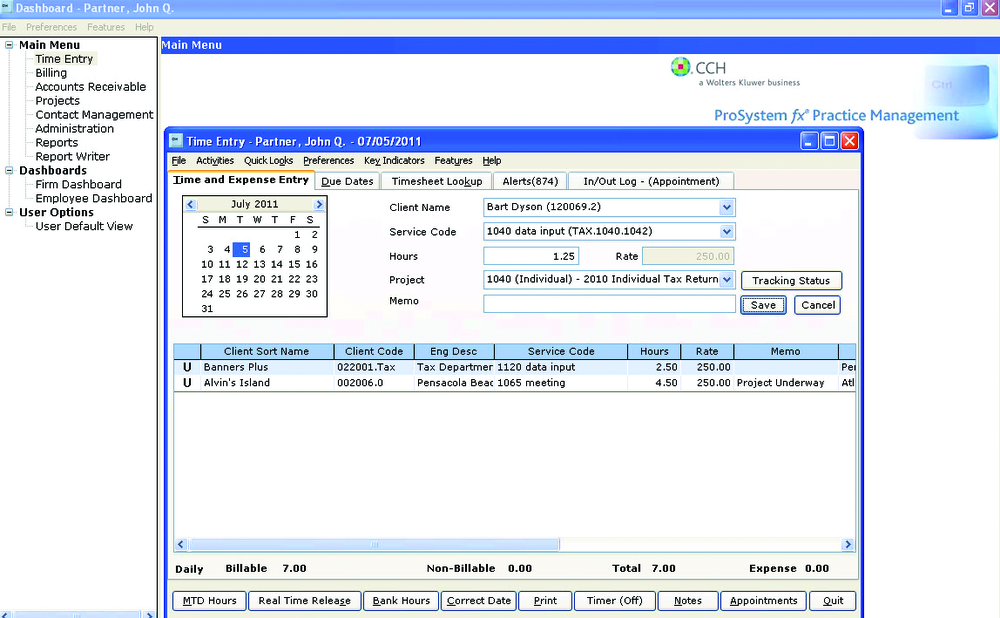
The time entry screen shows a calendar in graphical format and provides fields for entering a client name, service code, hours, project name, and a memo field, which can either appear on detailed invoices or marked “internal” to never appear on invoices. For quick data entry, the user can type the first few letters or numbers of the client’s name and service code, and the program will perform auto-complete functions. Or the user can select items from a drop-down list.

An unlimited number of timers, which run independently of ProSystem fx Practice Management and appear in the Windows Tray, can be used to accurately track the amount of time spent on projects. Users can review the amount of time entered for a period and then release them to the database. Internet time entry is available as an add-on feature. Benefits such as paid time off and CPE hours can be measured in the system, as well.

One of the stronger aspects of ProSystem fx Practice Management is its features for marketing and tracking prospects. Prospects can be created with the same contact information as clients, and the program can store referral sources, marketing methods, and employees assigned to prospects. Time and expenses can be entered for prospects, but they cannot be billed.

Invoicing Functions:

This content continues onto the next page...