
Sage Master Builder
Sep. 05, 2014
Sage Master Builder is a comprehensive financial product designed specifically for mid-sized construction and contracting businesses. Sage Master Builder contains an easily navigated user interface and the job cost functionality that construction-related businesses need. The latest version of Master Builder is due out in July 2011.
BASIC SYSTEM FUNCTIONS
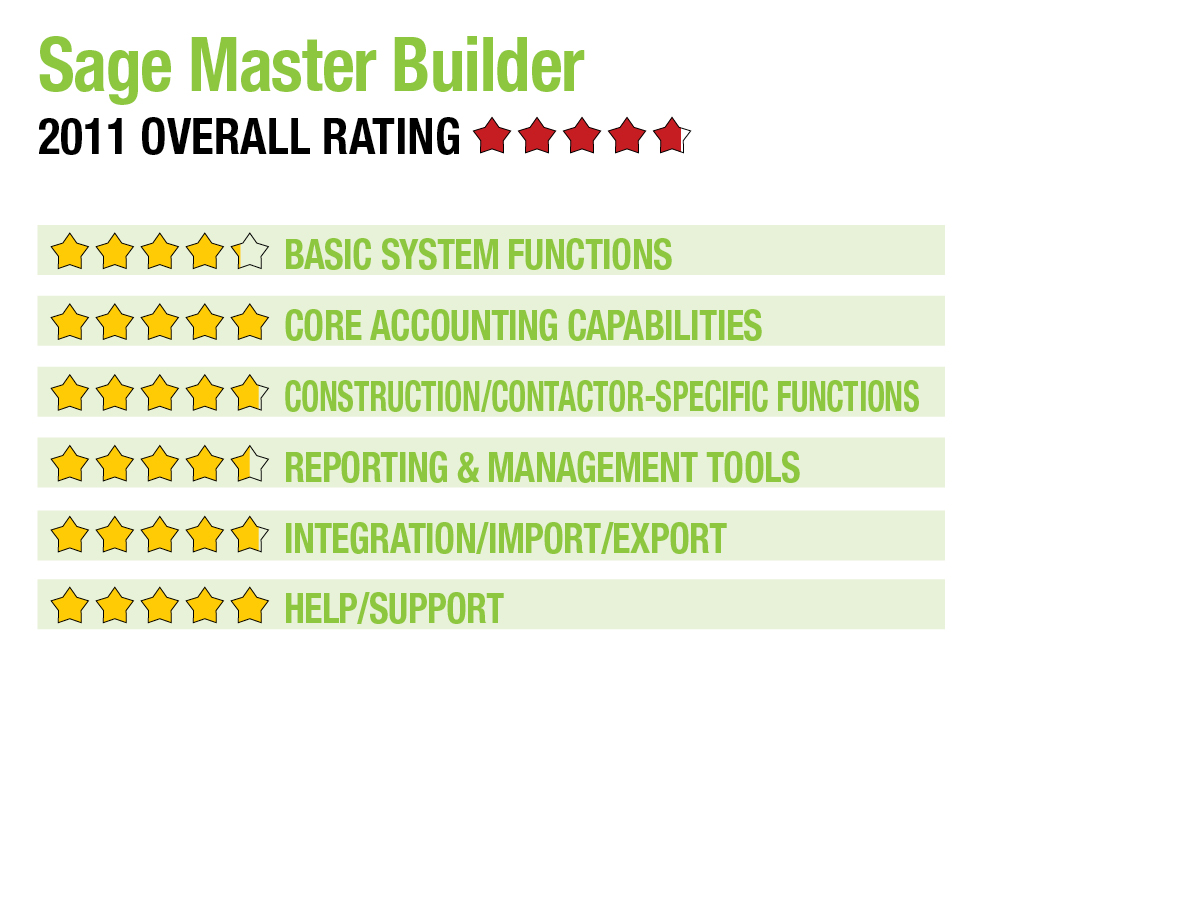
Sage Master Builder contains an easy to navigate user interface with all system modules listed on the left side of the main screen. Function-level options are found at the top of the screen. Clicking on a module will display all related functions within that module. Data-entry screens are logically structured and contain various tabs that allow for additional information. Master Builder makes great use of templates and grids. The latest version of Master Builder also contains an enhanced Dashboard capability, with terrific customization and drilldown capability. Users can also create custom portals to store quick links to all frequently used system functions. Sage Master Builder also integrates with Sage CRM and is built on a Windows platform, working with Windows 7, Vista and XP. 4.25
CORE ACCOUNTING CAPABILITIES
Designed to completely integrate with all job-related modules, Master Builder’s GL allows for up to a 10-digit account number structure that can be customized for each business. Users can choose to utilize one of four construction/contractor-specific chart of accounts or create a custom-built one if desired. GL transactions can be posted to previous or future periods as needed. The AP module allows users to create invoices and invoice credits, enter vouchers and lien waivers for invoices, and enter recurring payables. A credit card management option is also available. Vital items such as loan payments and vehicle purchases are also managed in the AP module. The AR module provides several billing options including progress billing, AIA billing and time & materials billing. It also tracks loan draws. The Master Builder Payroll module easily handles union benefit tracking, prevailing wage details and all benefit plans. Labor and job costs are also calculated in Payroll, which can support piece work payments and per diem rate calculations. Master Builder contains excellent audit trail functionality, including features such as the audit error function, the payroll audit function and the audit history. System user security is solid, with all users assigned to a user group, with the corresponding system access based on each group. 5
CONSTRUCTION/CONTRACTOR-SPECIFIC FEATURES
Sage Master Builder offers three levels of estimating. The Basic level is aimed at smaller companies and those without specialized needs. For businesses requiring more specialized estimating features, such as industry-specific knowledgebases and the ability to utilize more analysis tools like greater takeoff and productivity, Standard and Extended estimated options are available, as well. Master Builder also integrates with various third-party estimating products if needed. Project managers will appreciate the excellent scheduling module that can generate specific task lists for both vendors and subcontractors, and the ability to update schedules as needed. Change order processing is easy, with most completed from a single screen. Change orders can also be added to any subcontract in the system.
Master Builder can easily track detailed customer information, along with billing history and payment details. Navigational tabs at the bottom of the screen offer quick access to all related information on that customer. Vendor information is easily tracked, as well, and users can set billing detail such as default items specific to that vendor. Payments and certificates can be managed from the Vendors option, as well. The Employees option tracks all employee information including all salary advances, bonuses and all deductions, both current and historical. Subcontracts allows users to properly track subcontract job information, including budgets and payment information. Users can also track workers compensation and liability insurance certificates. The Inventory module monitors inventory in multiple locations, handles both stock and serialized inventory, and can apply in-stock inventory directly to a job.
Purchase Orders are generated directly from system estimates, making it easy to ensure that needed materials are ordered. It also allows project managers to order parts in stages. The Equipment Management function allows users to allocate equipment costs directly to a job and determine cost recovery options. Maintenance reports track scheduled maintenance on all equipment and calculate depreciation. The Service Manager contains an excellent dispatch board that has been enhanced in the latest version of Master Builder, where users can create prioritized calls using a color-coded system. Dispatchers can also schedule technicians for up to five days in advance and can email service orders to technicians in the field. Service Manager also handles all outside service contracts, warranty information, scheduled maintenance and service history. 4.75
REPORTING & MANAGEMENT TOOLS
Sage Master Builder contains more than 1,000 reports. Users can easily create links to frequently run reports on their desktop. Reports are customizable, and all contain drilldown capability. The Job Status report provides detailed information for each job, including original contract amounts, a list of any change orders, total invoiced to date and percent complete. Dashboard enhancements are impressive in Master Builder, and the Executive Dashboard provides managers with useful data on cash position, change orders and job profitability. The new Alerts function in Master Builder monitors the database for things such as overbudget items, and users can easily set parameters for the alerts, such as frequency and time, along with where the alert should be sent. Other reports, such as Progress Billing and Time & Materials Billing will keep managers in the loop. The Project Work Center provides quick access to key job details, including hot lists, job costs, Gantt Chart and critical path schedules. The Document Control feature provides a central location for all vital data related to any job. Templates can be created throughout Master Builder, and the payroll module easily handles employee time tracking. 4.5
INTEGRATION/IMPORT/EXPORT
Sage Master Builder’s core financial product easily integrates will all Master Builder add-on modules, including Estimating, Service Receivables and Inventory, as well as numerous third-party applications. Master Builder also integrates with Microsoft Office products and allows users to easily email documents directly to recipients. 4.75
HELP/SUPPORT
Excellent Help functionality is available as well as other tools such as a Getting Started Guide, which is useful for those new to Sage products. Three levels of support (Bronze, Silver and Gold) are available, and the Online Support option allows users to email technical questions to support personnel as well as access the Technical Support Knowledgebase and any product updates. 5
SUMMARY & PRICING
Sage Master Builder currently costs around $5,000 for the core system, which includes GL, AP, AR, Payroll and Equipment Costing. Other modules are extra. Sage Master Builder is a solid financial product and is an excellent fit for mid-sized construction companies that require estimating and equipment management capabilities.
2011 Overall Rating 4.75
Best Fit:
Sage Master Builder is a comprehensive financial product designed specifically for mid-sized construction and contracting businesses.
Strengths:
- Enhanced Dashboard capability
- Offers custom portals for storing quick links to frequently used system functions
- Integrates with Sage CRM
- Strong payroll functionality
- Excellent audit trail
- Strong industry-specific feature set; includes enhanced dispatch/scheduling & three levels of estimating
Potential Limitations:
- No SaaS capability
- Cost could be prohibitive to smaller entities
Product Delivery Methods:
_x_ On-Premises
___ SaaS
___ Hosted by Vendor