



800-805-8582
www.sureprep.com
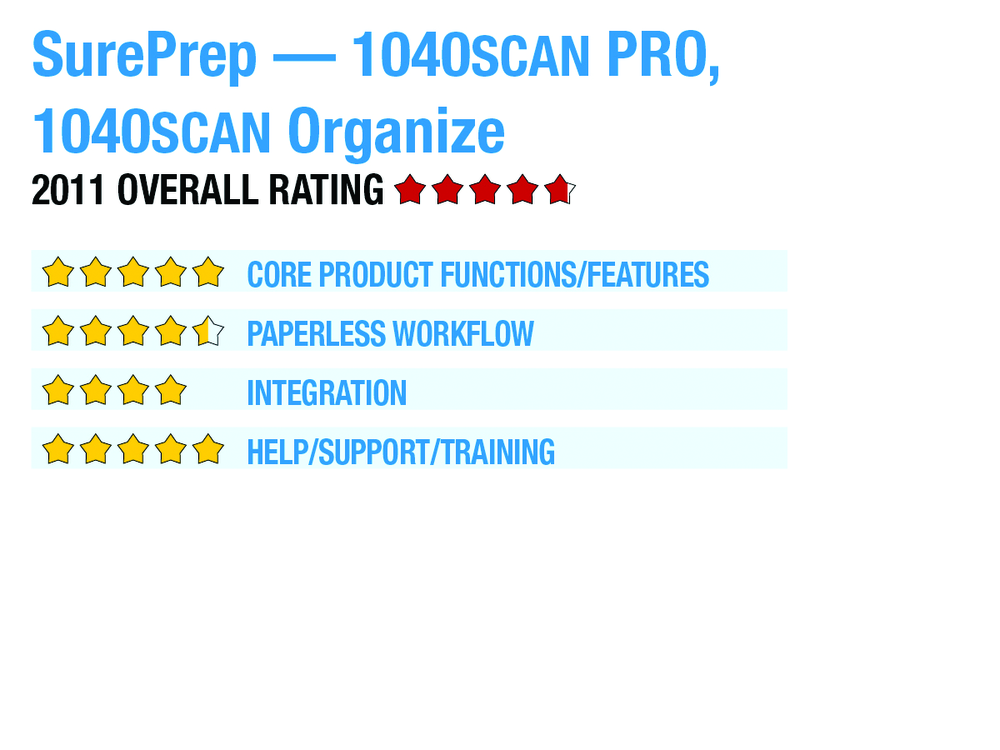
2011 Overall Rating 4.75
Best Fit
- Firms where more than one person is involved in the return preparation process.
- Organizations willing to use SurePrep’s proprietary SPBinder documentation tool.
- Practitioners who are comfortable using paraprofessionals to handle the majority of the data input associated with a client.
Strengths
- Guides and certification process designed to help users optimize the quality of scanned images are the best in the industry.
- SurePrep’s outsourcing operations prepare tens of thousands of returns each year using these tools, and this experience gives them immediate, direct feedback on how screen changes impact the data-entry process.
- There are a variety of product offerings (1040Scan Organize, 1040SCAN TRADES and 1040SCAN Pro) for the individual needs of each return.
Potential Limitations
- Data-entry interface used to validate data extracted from scanned images is proprietary to 1040SCAN, and is different from the tax applications.
SurePrep was one of the earliest entrants into the tax document automation field, and has evolved and extended its offerings to meet the demands of practitioners. SurePrep’s 1040SCAN application is focused on reorganizing the workflow inside of tax and accounting firms. Although there are portions of the application that are installed on a user’s local computer, the actual source document recognition is handled at SurePrep’s secure onshore data center. The application provides its own input screens for supported applications, which include GoSystem Tax, Global fx, Lacerte, ProSystem fx Tax and UltraTax CS. This design simplifies the use of data-entry clerks to validate the data extracted by the application, and also eliminates the need for these personnel to work directly with the tax application.
Executive Summary & Pricing
SurePrep was one of the earliest entrants into the tax document automation field, and has evolved and extended its offerings to meet the demands of practitioners. SurePrep’s 1040SCAN application is focused on reorganizing the workflow inside of tax and accounting firms. Although there are portions of the application that are installed on a user’s local computer, the actual source document recognition is handled at SurePrep’s secure onshore data center. The application provides its own input screens for supported applications, which include GoSystem Tax, Global fx, Lacerte, ProSystem fx Tax and UltraTax CS. This design simplifies the use of data-entry clerks to validate the data extracted by the application, and also eliminates the need for these personnel to work directly with the tax application.
Suggested retail pricing is as follows:
1040SCAN Organize – $10/return
1040SCAN TRADES – $20/return (regardless of the number of trades)
1040SCAN Pro – S30/return
Significant discounts to these rates are available to users based on transaction volume and multi-year purchase commitments. A list of SurePrep’s 1040SCAN Supported Forms can be found at http://corp.sureprep.com/SUPPORT/FAQ.aspx.
Core Product Functions/Features – 5
Paperless Workflow – 4.5
Integration – 4
Help/Support/Training – 5
Sign in to get access to this free resource, and all of our whitepapers and reports.

Download this content today!
Register Now Already registered? Click here to Log In


Mohammad S Khan January 29 2025 at 5:40 pm
is sureprep web based. is there any place where I can get raining to install and run