
Technology
eTEK International Inc. — eTEK for Microsoft Office 2010
Sep. 05, 2014
eTEK International Inc. — eTEK for Microsoft Office 2010
800-888-6894
www.etek.net
From the July 2011 Review Construction and Contractor Accounting Systems
Best Fit:
eTEK is scalable and an excellent choice for smaller construction companies in need of good job cost functionality that need to upgrade from entry-level products.
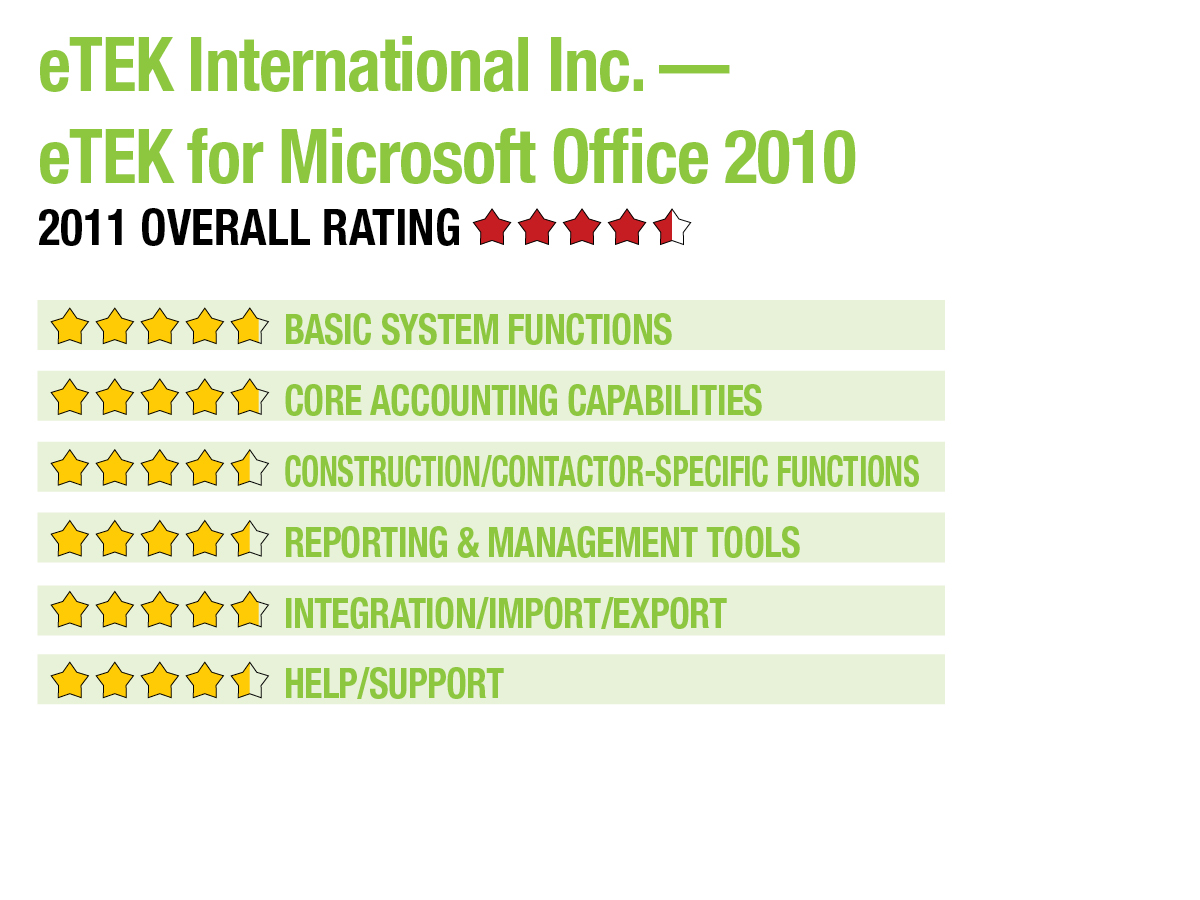
eTEK for Microsoft Office is a completely integrated financial system that offers specialty software to a variety of industries. An excellent choice for smaller construction companies looking to expand from entry-level products, eTEK for Microsoft Office 2010 is scalable and easily navigated with solid job cost capability.
BASIC SYSTEM FUNCTIONS:
eTEK is designed using the Microsoft 2010 Office user interface, an upgrade from the 2007 product. Particularly useful to experienced Microsoft Office users, eTEK’s user interface builds on this technology, making it easy to find the desired system features. Function icons are found at the top of eTEK’s main screen, with system modules listed directly below. Clicking on a module displays all of the related functions within that module and the corresponding features.
.. |
eTEK provides easy system navigation, with well-structured data-entry screens that offer numerous lookup options. New users may also find the setup checklists useful, designed to ensure that all required information is entered. Inquiry screens that are found throughout the system create quick financial reports that display needed job and financial information. Users can also choose from five different data-entry screens. eTEK provides the capability to create a job template that can be saved for future use.
Users can customize the eTEK toolbar to display the items they want. eTEK is available as a traditional desktop product in a network environment, or as a web-based SaaS product, making multi-location and remote access a breeze. Built for a Windows platform, eTEK works with Windows 7, Vista and XP.
CORE ACCOUNTING CAPABILITIES:
The GL module in eTEK allows users to enter data in real time, or users can choose to use a batch system. Transactions can be entered to post to any fiscal period at any time, even closed periods.
eTEK is completely used-defined and utilizes up to four segments of nine digits each. Users can also set up recurring journal entries, with reversing entries attached. The AP module can handle multiple cash accounts, and users can add suppliers on the fly, eliminating the need to close the module and enter the supplier information elsewhere. Invoice templates can be created and utilized for quick invoicing options, and recurring invoices can be set up in the system for automatic processing. The AR module allows users to automatically assign payments to outstanding invoices, and can create multiple billing types including AIA Invoicing, Time & Materials and Contract Billing. The Payroll module tracks multiple employee compensation types, and supports direct deposit and multi-location payrolls. Users can enter payroll information quickly using the Quick Time entry function.
eTEK also contains numerous financial modules, including Inventory, Purchasing and Cash Management. Audit trail functionality is solid, with all system transactions assigned a batch number, making it easy to review system transactions. eTEK also offers good user security with both menu-level and function-level security.
CONSTRUCTION/CONTRACTOR SPECIFIC FEATURES:
eTEK’s estimating feature allows users to create job estimates at any level. The Estimates to Complete function provides users with a solid work in progress analysis, and also offers good cost control. Estimates can be easily entered in a variety of categories including labor and overtime hours, along with material costs. The Job Cost Master Editor is an excellent feature that provides management with the necessary detail for each job entered in the system. Change orders can be processed in the job cost master file, with eTEK automatically tracking any changes for both customers and subcontractors.
The system provides excellent customer data tracking along with options to track relevant information including all customer activity, a detailed payment history, and both payment and discount averages. Users can also track historical AIA billing information using a variety of search criteria including job information, change order summary, certificate for payment, and continuation sheets. Detailed vendor purchasing history is tracked in eTEK’s AP module along with supplier payment information. The Payroll module tracks employee payment histories and tax deductions, and other user-defined deductions can be managed, as well. Historical information on subcontracts can be tracked by job or subcontractor. Users also have access to detailed information on items such as change order amounts and balances due.
The Inventory module provides an unlimited number of user-defined units of measures, and all inventory items can be entered utilizing assemblies, kitting, product groups, etc. Multi-location warehouse functionality is also available. The Purchasing module provides users with PO status and provides the ability to drilldown into originating documents. An excellent Equipment Management module keeps track of equipment costs for each job, with the ability to track labor costs attached to a particular job. Users can also monitor equipment serial numbers and attach descriptions and photos if needed.
REPORTING & MANAGEMENT TOOLS:
eTEK contains an excellent selection of standard reports, including the Job Recap Report and the Job Cost Report, which offers management a detailed view of all jobs. AIA compliant invoicing is available, and templates can be easily created and maintained due to the excellent integration between eTEK and Microsoft Office products. All reports can be easily exported to a variety of formats including PDF, XPS, Excel, Word or Text. Reports can also be emailed to recipients directly from the print screen. A Report Wizard provides users with report customization capability, and remote access is provided with eTEK’s SaaS product offering.
INTEGRATION/IMPORT/EXPORT:
All eTEK modules integrate seamlessly, providing a comprehensive financial product for contractors. eTEK can also import directly from various third-party applications and offers excellent integration with all Microsoft Office products.
HELP/SUPPORT:
eTEK provides a comprehensive Help function within the product. Various videos are available to assist new users with system navigation. eTEK also offers a selection of support agreements that will suit most anyone’s needs, with support generally running approximately 20 percent of the total license fee. eTEK also provides users with a private blog, where they can access software information, look for answers to FAQs and even access system updates when released.
SUMMARY & PRICING
While eTEK is much more than a construction product, it does offer construction-related businesses a solid product that offers flexibility and affordability. Currently priced at $3,856 for a single user system, the price includes core accounting modules (GL, AP, AR, PR) along with both Job Cost and Supply Chain Management with first-year product support and training.
2011 Overall Rating