Review of FileCabinet CS - 2011
Thomson Reuters - FileCabinet CS
800-968-8900
cs.thomsonreuterscom
From the June 2011 Review of Document Management Systems
Best Firm Fit:
There is no question that the ideal firm to implement FileCabinet CS is one using the other CS Professional Suite of applications: UltraTax CS, Accounting CS, Engagement CS, etc. The system was designed from the ground up to be a repository for documents and reports generated by the CS Professional Suite of applications. On the other hand, the value of FileCabinet CS is significantly diminished if you don’t use any other CS applications.
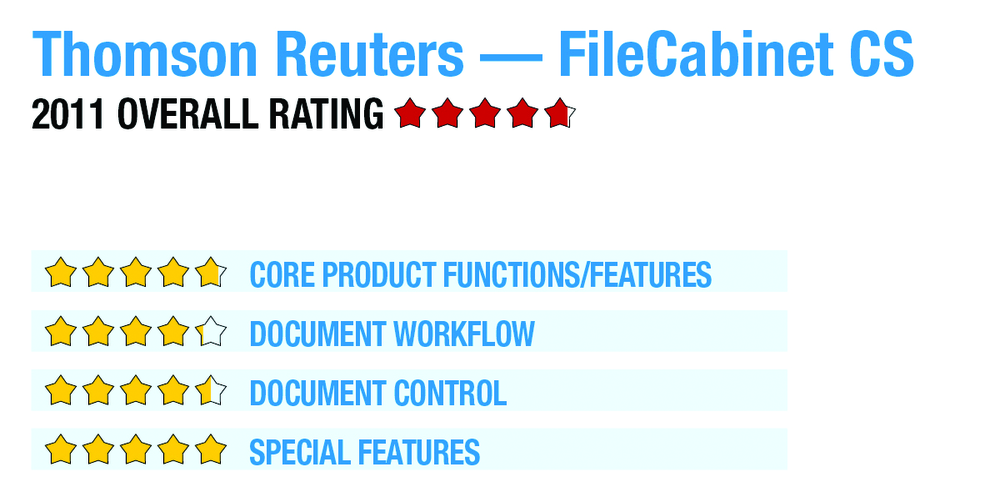
Core Product Functions/Features: 
FileCabinet CS offers an intuitive interface that is easy to navigate. The home page consists of a client list panel on the left, command menu and toolbar along the top, and panels listing open tasks, recent document activity and data locations. When a new client is created in the application, an engagement type template is used to create a sub folder structure. Firms can customize the folder templates for each service type or practice group.
When a user clicks on a client’s folder, the sub folders expand to show a separate folder for each CS application, with additional sub folders for each year. Firms have the option to reverse this display if preferred (e.g. to show the years as the parent folders and the applications as the sub folders). When a user clicks on a file to open or view the document, a toolbar of built-in annotation tools is presented to markup the documents. These annotations include adding audio clips and applying a signature. These tools are excellent for adding document-specific notes.
|
FileCabinet CS essentially offers three methods for uploading files: the FileCabinet print driver in Windows, scanning (or importing existing image files), and direct integration with the other CS applications. After scanning, an additional process will perform an OCR conversion, and there is an optional forms recognition application (UltraTax Source Document Processing) for 1040 source documents. Data from these source documents will be imported directly into UltraTax.
Document Workflow: 
The most compelling feature of FileCabinet CS is its direct integration with the other applications in the CS Professional Suite. When a staff member publishes a document or report from a CS application, it automatically saves it in the proper folder in FileCabinet CS. Users can add Microsoft Office files directly to FileCabinet CS as static documents in EMF format or they can be stored as active (editable) documents in native Microsoft Office format. Microsoft Outlook can be configured to automatically send outgoing messages directly to FileCabinet CS for filing.
There is no workflow functionality built into FileCabinet CS. The major engagement management functions in the CS suite of applications are housed within Practice CS, and are not included in this review.
Document Control: 
FileCabinet CS allows users to establish detailed, granular security permissions. These settings can be established at the user or group level, and a detailed activity audit trail is maintained. Firms can also restrict access to specific data locations, i.e. personnel files, high profile clients, etc.
An archiving function lets personnel remove documents from the active storage and transfer them to a secondary storage device. A firm can define the parameters for which documents are archived using this method. There is no functionality to support document version control; this requires scanning and filing a second copy of the information.
- « Previous Page
- 1
- 2
- Next Page »