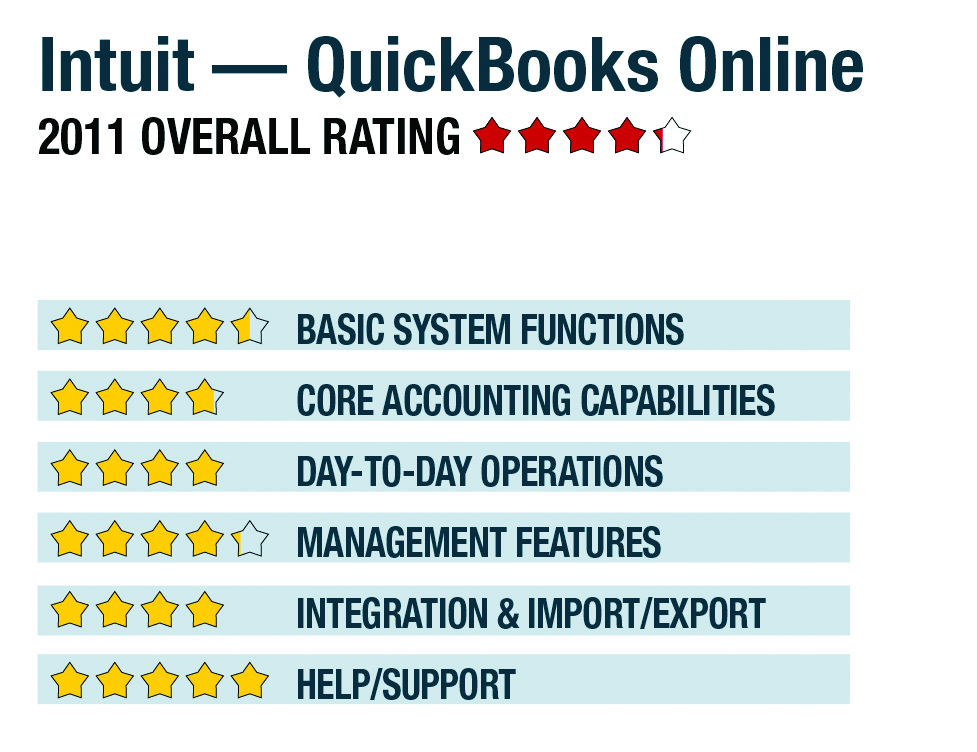
Review of QuickBooks Online - 2011

Management Features:
Although not identified as a dashboard, the Company Snapshot Report is a customizable dashboard of sorts, displaying charts and graphs of items such as income, expenses, period comparisons, receivables and payables, with the ability to click through to supporting reports. As previously noted, the home screen and customer and vendor centers don’t provide key data overviews or action items, but they do provide links to common functions, including recent transactions.

The reporting system houses a collection of more than 65 customizable options, presented in plain English, for standard items such as income statement, balance sheets, cash flow statements, a trial balance, account listings, transaction reports, AR reports, collections, income by client, as well as numerous options for sales, vendors and banking. Users can save reports into sets, and the program offers accountant-focused output, including trial balance, adjusted trial balance, GL, transaction detail, the journal, adjusting entries and other options.

User-level security features enable role-based restrictions on access to clients, sales, vendors and purchases, as well limitations on system administrator functions.

Integration/Import/Export:
QuickBooks Online can import data from most recent versions of the traditional QuickBooks system, as well as via a two-step export-import process from other accounting programs. The program can also import customer data from Excel. Reports can be easily printed, e-mailed or exported to a spreadsheet. The service recently began to offer integration with Bill.com, Expensify and AuditMyBooks. QuickBooks Online does not have client portals or the ability to store scanned documents (such as receipts, bills, warranties, etc). However, the new beta ACH payment system offers online access to payment histories. An accountant login is included with all versions, with the business’ approval, and therefore always works with live data.

Help/Support:
QuickBooks Online provides a very easy-to-use system and offers topic-related Help from the How Do I? button located on every page. A traditional Help index is also available, as well as a link to online support, which provides additional topical guidance, how-tos, and other task-based assistance. It also provides links to FAQs, user guides, the QuickBooks Online blog and an online user support community. Support is U.S.-based, and, unlike the installed version, support for QuickBooks Online is completely free and available by phone and email Monday through Saturday.

Executive Summary & Pricing
QuickBooks Online is a good fit for very small businesses that are either service-based or offer simple goods. It has limited inventory and integration options, and doesn’t have e-commerce capabilities, but for most small businesses, the program provides an easy-to-use business management system, with payroll, integrated e-banking and good accountant-focused reporting. All of this in a web-based format that gets rid of IT headaches and allows anytime/anywhere access, including the availability of apps for popular mobile gadgets. Pricing for Online Plus is $39.95 per month for up to five users; Essentials is $24.95 per month for up to three users; Simple Start is $12.95 per month for one user. The payroll option is available for Essentials and Online Plus.

2011 Overall Rating: