
Software
Lacerte Tax, an Intuit ProLine Solution
Sep. 05, 2014
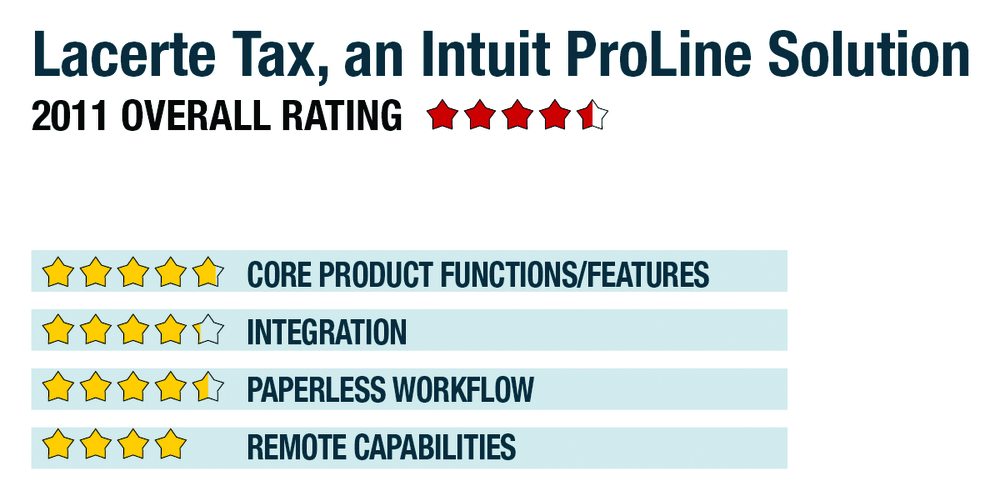
2011 OVERALL RATING 4.50
800-765-7777
www.proline.lacertesoftware.com
Product delivery methods:
__x___ On-Premises
__x___ SaaS
_____ Hosted by Vendor
BEST FIRM FIT:
Competitive solution for small and mid-sized firms with some advanced workflow needs beyond the capabilities of the Traditional Workflow products without the most complex requirements of the Advanced Workflow products like multi-tiered consolidations, multi-office, etc.
STRENGTHS:
- ProLine Tax Import offers a website to help users download and import securities transaction data from investment banks
- Pay-per-return option attractive for startup firms & those who need advanced functionality without a large up-front payment
- New organizer for trust returns, support for using organizer as a workpaper
- This year’s version adds e-filing for state partnership & corporate tax in 23 jurisdictions
- Excellent QuickBooks integration with Lacerte SmartMap tool
POTENTIAL WEAKNESSES:
- Lack of a vendor-hosted or SaaS version of this product, although some third-party hosting companies offer this service
- Client Tracker is not compatible with Windows Vista/Windows 7
- Some supporting applications in the suite are very new (ProLine Practice Management & ProLine Tax Research), and not as complete as the more established competitor products
- Other products (EasyAcct write-up solution) have limited adoption & enhancements
EXECUTIVE SUMMARY & PRICING:
Lacerte Tax can handle a wide range of tax compliance issues and is intended for firms with a complex client base, high-return volume or those who are reliant on its extensive QuickBooks product integration. Pricing has been streamlined, and, for the second year, bundle-based discounts of groups of Intuit practitioner tools are being offered. All bundles include document management solutions as well as entry-level tax planning. Bundles include a various mix of individual and business return modules and range in price from $5,049 to $12,949. Modules may be purchased separately, with business modules starting at $1,579. Per-return-pricing is also available.
4.75 – CORE PRODUCT FUNCTIONS/FEATURES
- · Product depth/multi-state
- · Navigation/ease of use
- · Support for special situations
- · Analytical review
- · Electronic filing
4.25 – INTEGRATION
- · w/in publisher’s own suite
- · w/tax research tools & guidance
- · w/other or external programs
- · w/practice management
- · w/external services
4.5 – PAPERLESS WORKFLOW
- · paperless creation
- · paperless open items
- · paperless review
- · access control for limiting access into returns
- · digital document storage/mgmt.
- · data import/output
4 – REMOTE CAPABILITIES
- portal
- remotes access
- 1099 depot
- Outsourced document prep
- Hosting
- Web-based