
Software
Intuit — ProLine Tax Online Edition
Sep. 05, 2014
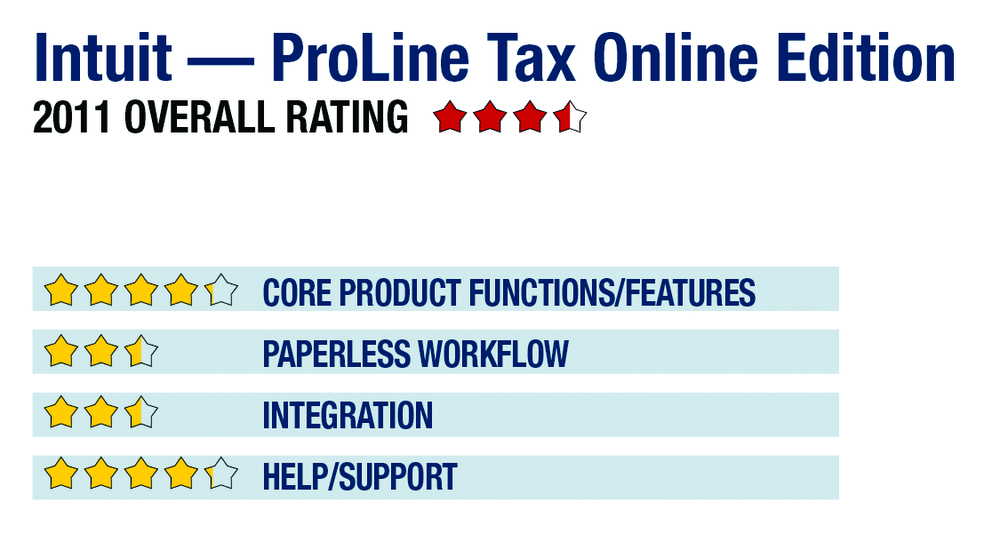
2011 Overall Rating 3.5
888-236-9501
accountant.intuit.com
Product Delivery Methods:
_____ On-Premises
__x__ SaaS
_____ Hosted by Vendor
Best Fit:
Small practices with generally less complex clients, primarily 1040-focused who need mobility
Strengths:
- Web-based
- No IT headaches
- Inexpensive
- Instant ramp-up/down
- Any number of users
- On-demand use
- PC & Mac friendly
Potential Limitations:
- Lack of integration with accounting programs
- Paperless limited to PDF output
- No client portals
- No business management/billing functions
Executive Summary & Pricing:
ProLine Tax Online is an exceptionally easy-to-use and affordable tax compliance system and, with the addition of support for all business entities and state filing, is suited to professionals who want the benefits of a completely web-based system with no updates or IT headaches. The program is best suited toward returns with lower complexity levels, and it still lacks many popular workflow features, such as scan, organize and populate functions. PTO has no startup costs, allowing preparers to actually use the live and fully featured system (minus actual filing) for free before they purchase it. It can be used on a per-return basis at $29.99 per individual return ($39.99 for business entities), which includes all federal, state and multi-state electronic filings. Pre-paid return bundles can also be purchased, with 20- and 50-return options costing $299 and $499 respectively, thereby dropping per-return costs to as low as $9.99. There is no additional charge for multiple users; any number of preparers and staff can actively work in the system.
The program’s pricing and feature set makes it best suited to smaller practices, including sole practitioners who want a professional tax compliance system that costs nothing and requires no IT assistance to start up. It has a very simple interface that guides users through data entry, and can be accessed from anywhere at any time. Firms can also add staff at any time and with no additional costs. It is not well-suited to firms with more complex client engagements that require extensive collaboration between professional staff during preparation and review processes.
4.25 – Core Product Functions/Features
product depth/multi-state
navigation/ease-of-use
support for special situations
electronic filing
2.5 – Paperless Workflow
paperless creation
paperless open items
access control for limiting access into returns
digital document storage/mgmt.
data import/export
2.5 – Integration
w/in Publisher’s own suite
w/tax research tools & guidance
w/other or external programs
w/external services
4.25 – Help/Support
online resource center
tech assistance availability
Downloadable program updates
Preferred SaaS route