
Software
CCH Small Firm Services — TaxWise
Sep. 05, 2014
800-755-9473
www.taxwise.com
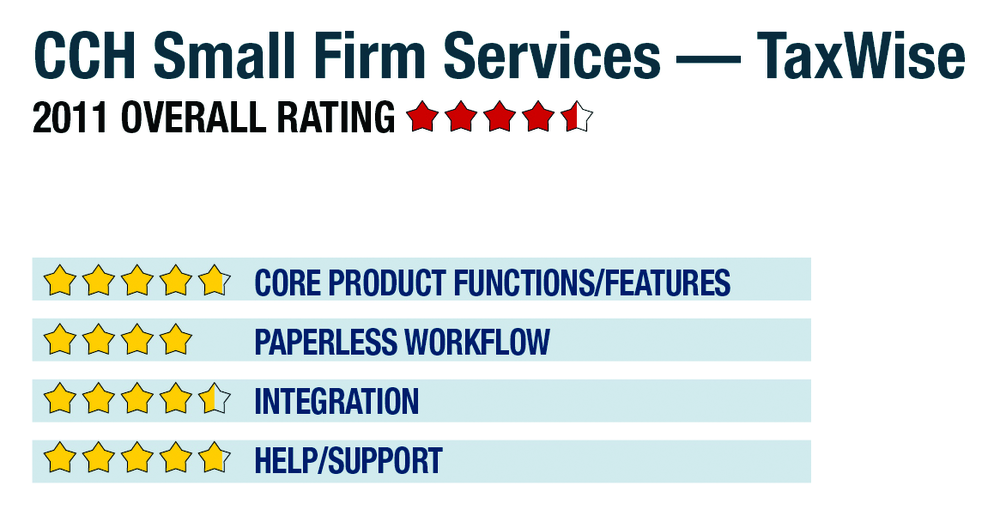
2011 Overall Rating 4.5
Best Firm Fit:
High-volume, time-sensitive focused practices employing non-professional data-entry staff. Also a fit for those looking to grow their business through office expansion and additional customer offerings such as full-year accounting services like write-up and payroll.
Strengths
– Support for all entities at federal & state level
– Form & interview-style input with instant calculations
– Excellent training options for novice staff
– Scan & populate feature for W-2s and 1099s
– Options for research, trial balance, payroll, fixed assets and document management
Potential Limitations
– No client portals
– Limited tools for in-firm collaboration on complex returns
Executive Summary & Pricing
TaxWise offers bundles that can include virtually every aspect of tax preparation and public accounting, with all forms, states and cities. While the core tax system can manage moderately complex returns for most entities, the program is best geared toward time-sensitive, high-volume practices. It provides ease of use and features for integrated billing, strong bank products, multi-office management and support for remote retail locations, allowing these tax firms to quickly ramp up and add data entry staff to reach more customers. While there are no portals and its source document automation features are limited, the system offers good paperless workflow tools for small and mid-sized practices, with pricing flexible based on the selected bundle. The Power Package costs $2,515 for all entities, all states, all local, unlimited e-filing and tax research products, and can be used by any number of preparers in the same office. For firms with limited filing requirements, the Executive Package is $1,400, and includes many of the same features. TaxWise is also available on a pay-per-return basis, with a $150 annual fee, and a minimum of $300 of returns, priced at $20 each for single state 1040s and $35 each for single state business returns.
Product Delivery Methods:
__x__ On-Premises
__x__ SaaS (limited to 1040 module)
_____ Hosted by Vendor
4.75 – Core Product Functions/Features
product depth/multi-state
navigation/ease-of-use
support for special situations
electronic filing
4 – Paperless Workflow
paperless creation
paperless open items
access control for limiting access into returns
digital document storage/mgmt.
data import/export
4.5 – Integration
w/in Publisher’s own suite
w/tax research tools & guidance
w/other or external programs
w/external services
4.75 Help/Support
online resource center
tech assistance availability
Downloadable program updates
Preferred SaaS route